dartwork-mpl
matplotlib, but beautiful.
Built for AI agents.
Publication-quality plots with zero learning curve.
Just want to see it plot? Jump straight to the Quick Example.
Built for AI-assisted plotting
Most matplotlib code in 2026 is written through an agent — Cursor, Claude Code, Continue, Windsurf, Zed Agent panel, Aider — not by typing into a blank notebook. dartwork-mpl is the first design layer on top of matplotlib that is built for that workflow: every API is unambiguous, every color and width has a name (not a hex or a float), the bundled MCP server lets agents read the docs live, and a lint engine catches the patterns LLMs typically get wrong.
One JSON snippet wires dartwork-mpl-mcp into Claude Code, Cursor,
Windsurf, Continue, or Zed. The agent gets live docs, anti-pattern
lint, color lookup, and plot templates — inside the chat context.
pip install "dartwork-mpl[mcp]"
No MCP? llms.txt (2.5 KB index) and llms-full.txt (45 KB full
reference) drop straight into Aider, Copilot Chat, ChatGPT, or
Claude.ai. Resolve them from Python with
dm.agent_doc_path("llms-full") / dm.get_agent_doc("llms-full").
Drag the slider — same data, two worlds
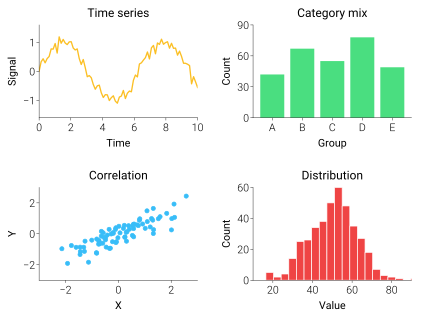
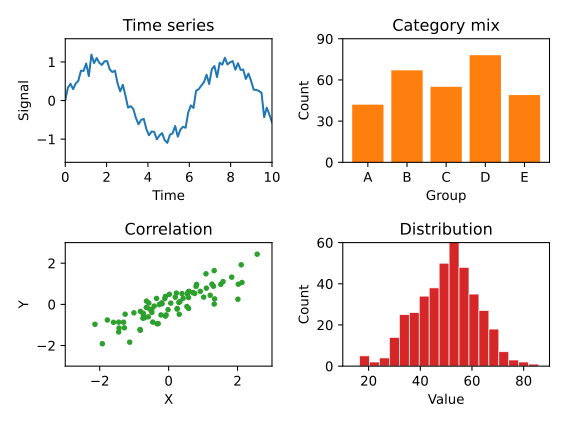
Drag the divider to inspect the seam. The left half is what
plt.savefig() writes with default rcParams; the right half is the
same script plus two dartwork-mpl calls — dm.style.use("scientific")
to swap the rcParams listed below the slider, and dm.simple_layout(fig)
to handle margins. No new plotting API, no axes wrappers, no opinions
about your data. Just the typography and layout knobs you would have set
yourself if you had the budget.
Quick Example
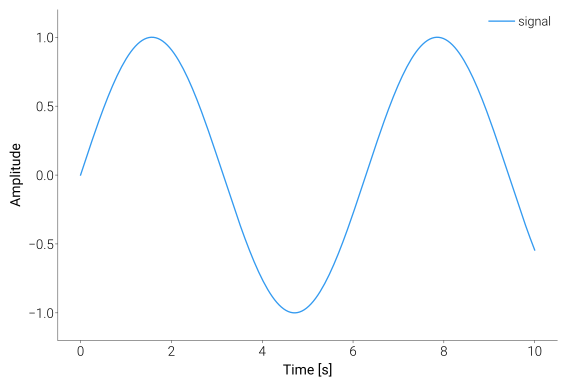
import matplotlib.pyplot as plt
import dartwork_mpl as dm

dm.style.use("scientific")              # Pick a style
fig, ax = plt.subplots()
ax.plot([1, 2, 3], [1, 4, 2])           # Regular matplotlib
dm.simple_layout(fig)                   # Better layout
dm.save_formats(fig, "output")          # Export SVG + PNG
What’s in the box
Seven curated themes — scientific, report, presentation,
poster, web, dark, minimal — each one tunes fonts, line
weights, spines, and ticks in a single dm.style.use(...) call.
dm.simple_layout(fig) measures every visible artist and snaps the
axes to consistent margins — twinx, colorbars, rotated ticks, and
long Korean labels included. No bbox_inches="tight" guessing.
Open Color, Tailwind, Material, Ant Design, Chakra, and Primer
shipped as plain color strings — color="dc.blue6" works anywhere
matplotlib accepts a color. Plus 43 OKLab/OKLCH-constructed continuous
colormaps and 13 qualitative colormaps, exposed as 56 family records.
dm.validate_figure(fig) flags overflow, asymmetric margins, and
pie-label cutoffs before you save. validate_with_fixes patches
the obvious ones for you.
dartwork-mpl never wraps Figure or Axes. It sets up the
environment and stays out of your way, so every matplotlib trick
you already know still works.
dm.save_formats(fig, "out", formats=("png", "svg", "pdf")) writes
all three at the right DPI in a single call — with an optional
validate=True to catch problems before they ship, and byte-identical
SVG/PDF/SVGZ output when the figure is unchanged.