Save and Validation
Save and preview
import matplotlib.pyplot as plt
import dartwork_mpl as dm
import numpy as np

dm.style.use("scientific")

fig, ax = plt.subplots(figsize=dm.figsize("9cm", "standard"))
ax.plot(np.arange(50), np.cumsum(np.random.randn(50)) + 20, color="dc.teal3")
dm.simple_layout(fig)

dm.save_formats(
    fig,
    "output/experiment",
    formats=("png", "svg", "pdf"),
    bbox_inches="tight",
    validate=True,   # runs visual checks before saving (see below)
)
dm.save_and_show(fig, "output/experiment")  # save + inline preview
dm.show("output/experiment.svg", size=540)  # display a saved file in notebooks
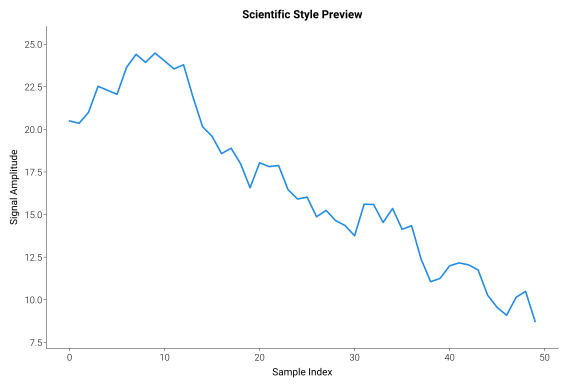
Key points:
save_formatswrites multiple formats in one call, with optional visual validationsave_and_showsaves and displays the figure inline in Jupyter/IPython, closing it by default (close_figure=True)showdisplays an existing SVG/PNG for notebooks or reportsSee API › Save & Export for argument details
Reproducible exports
save_formats makes SVG, PDF, and SVGZ reproducible by default for an
unchanged figure. SVG element ids are pinned with a svg.hashsalt derived
from the output basename, SVG/PDF timestamp metadata (Date /
CreationDate) is dropped, and SVGZ gzip output is written with mtime=0.
That means re-rendering the same chart does not churn version-controlled
artifacts.
Caller intent still wins: pass your own metadata to keep a timestamp
(metadata={"Date": ...} for SVG/SVGZ or metadata={"CreationDate": ...}
for PDF), or set matplotlib.rcParams["svg.hashsalt"] globally when you
want a project-wide salt instead of the output-basename salt.
Visual validation
Detect common rendering issues automatically — especially useful in AI agent pipelines where visual inspection is not available.
Tip
Try the live lint simulator that appears below this heading — slide
figure dimensions, tick counts, and label lengths to see exactly which
warnings dm.validate_figure() would emit. The same heuristics that ship
with the package are running in your browser.
import dartwork_mpl as dm

# Run all checks manually
warnings = dm.validate_figure(fig)
for w in warnings:
    print(w)

# Run specific checks only
warnings = dm.validate_figure(fig, checks=("OVERFLOW", "TICK_CROWD"))
When validate=True is passed to save_formats(), validation runs before
saving. If issues are found, they’re printed as warnings — the file is still
saved, but you’ll know what to fix.
Available checks: overflow detection, text overlap (within and across axes), legend overflow, tick crowding, tick-unit duplication, tick rotation, tick decimal precision, empty axes, margin asymmetry, pie label offsets, and clipped text. Example output:
⚠ OVERFLOW: Text 'ylabel' extends beyond figure bounds by 3.2 pt
⚠ TICK_CROWD: X-axis labels consume too much of the available span
Static reference: every warning validate_figure() can emit
Plain-text fallback for the live lint simulator — useful when
JavaScript is disabled (AI agents, terminal browsers, search-engine
indexing). Each row is one registered check_id from
dartwork_mpl.validate._checks;
the Severity column is the default classification, and the Fix
column is the suggestion delivered by
dm.validate_with_fixes(fig) / dm.validate_fixes.get_fix_suggestions.
|
Severity |
What it detects |
Suggested fix |
|---|---|---|---|
|
warning |
Text or axes content extends past the figure edge |
Re-run |
|
warning |
Two text labels visually overlap |
Rotate, abbreviate, or split into multiple panels |
|
warning |
Axis label declares a unit also shown on ticks |
Keep the unit in the axis label; use bare numeric tick labels |
|
warning |
Text labels from different axes overlap |
Increase |
|
warning |
Legend extends past axes / figure edge |
Move legend outside via |
|
info |
Tick labels consume too much of the axis span |
Reduce tick density ( |
|
info |
X tick labels are rotated needlessly or overlap |
Set |
|
warn/info |
Tick labels have mixed, duplicate, or excessive decimals |
Match formatter precision to |
|
info |
Axes carry no plotted artist |
Plot data or remove the empty axes via |
|
warning |
Left / right or top / bottom margins differ a lot |
Re-run |
|
info |
Pie wedge label sits outside its wedge |
Set |
|
warning |
A text artist is clipped at its axes boundary |
Disable clipping ( |
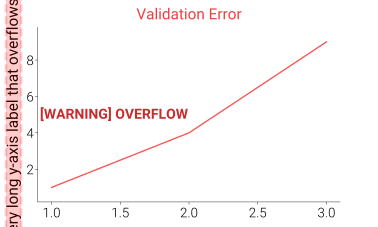
See API › Visual Validation for details.
See also
Next → Extended Plots & Diagnostics — ready-to-use plot templates and inspection tools
API › Save & Export for all save/export function arguments
Layout and Typography — optimize margins before saving