Recipes
Short copy-pasteable matplotlib snippets for the common spine and grid styling patterns. Each recipe is the canonical dartwork-mpl look written as raw matplotlib — drop into any axes after plotting.
Publication grid
A subtle grid behind the data, in dartwork-mpl’s recommended gray.
The set_axisbelow(True) call is what keeps lines and markers on
top of the grid — it is easy to forget when writing ax.grid(...)
directly.
ax.grid(
    True,
    which="major",
    color="dc.indigo1",
    alpha=0.3,
    linestyle="-",
    linewidth=0.5,
)
ax.set_axisbelow(True)
Minimal axes (Tufte style)
Top and right spines hidden, a light dashed y-grid for value estimation, and the remaining bottom/left spines drawn in a soft gray. Most publication figures use a variant of this pattern.
# Hide top and right spines
ax.spines["top"].set_visible(False)
ax.spines["right"].set_visible(False)

# Light dashed y-grid behind the data
ax.grid(
    True,
    axis="y",
    color="dc.indigo1",
    alpha=0.2,
    linestyle="--",
    linewidth=0.5,
)
ax.set_axisbelow(True)

# Soft gray bottom + left spines
for s in ("bottom", "left"):
    ax.spines[s].set_color("dc.indigo3")
    ax.spines[s].set_linewidth(0.5)
Thin gray spines
When you want all four spines visible but in dartwork-mpl’s recommended weight + color (typical for framed scientific figures).
for s in ax.spines.values():
    if s.get_visible():
        s.set_color("dc.indigo3")
        s.set_linewidth(0.5)
If you want only specific spines styled (e.g. left/bottom only), iterate over a name list instead:
for s in ("bottom", "left"):
    ax.spines[s].set_color("dc.teal2")
    ax.spines[s].set_linewidth(1.0)
Hide top and right spines (one-liner)
The shortest path to “minimal” without the grid or recoloring:
ax.spines["top"].set_visible(False)
ax.spines["right"].set_visible(False)
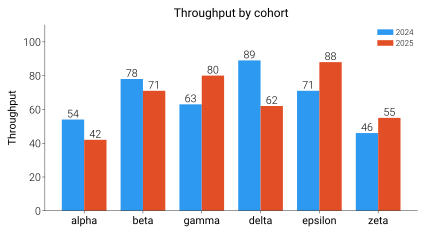
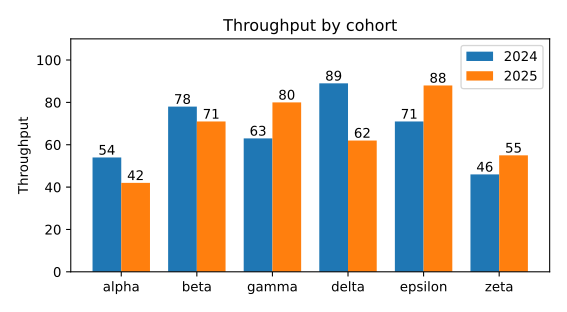
Before / after — grouped bars
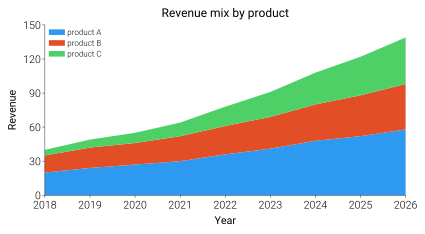
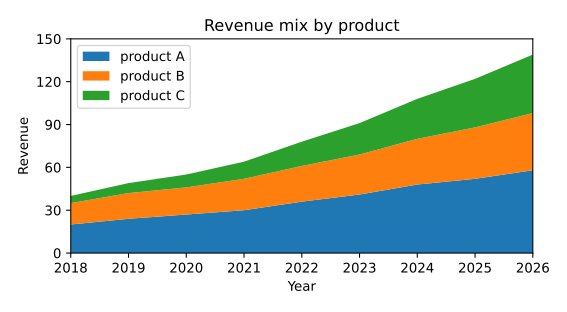
Drag the divider to see the exact same plotting code rendered with
vanilla matplotlib defaults vs dm.style.use("report") +
dm.simple_layout(fig, margin="2mm"). The bar values, labels, legend
entries, and tick positions are byte-identical — only the rcParams,
typography, and prop_cycle differ.
Before / after — stacked area
Why these are recipes, not functions
dartwork-mpl follows the utilities, not wrappers philosophy: thin matplotlib wrappers whose only contribution is default kwargs are a learning tax — every reader has to chase down what they expand to. Inlining the matplotlib calls keeps the project’s surface honest and the code self-explanatory. The recipes above preserve the curated values; nothing is lost.
This is also why the dm.style_spines, dm.add_grid, and
dm.minimal_axes wrappers were removed in 0.4.1
(#156) — the
curated kwargs they encoded now live in the recipes above.
See also
Layout and Typography —
simple_layoutand the spine / grid context these snippets tuneStyles and Presets — set a preset first; the recipes adjust what it leaves open
Colors and Colormaps — the
oc.*/dc.*tokens the snippets reference