Layout Utilities
Utilities for tightening layouts without juggling plt.subplots_adjust.
simple_layout measures visible artists and arithmetically places GridSpec
edges so axes content lands at the requested distance from the figure bounds;
make_offset nudges text/legends in point units; label_axes adds
standardized panel labels; annotate_value, annotate_corner, and
label_hline create compact point-offset labels; place_legend chooses
data/text-aware axes legend positions and can raise legend columns; arrow_axis
draws annotated bidirectional arrows; and wrap_axis_label /
set_decimal/get_bounding_box provide quick helpers when formatting axes.
Example
import numpy as np
import dartwork_mpl as dm

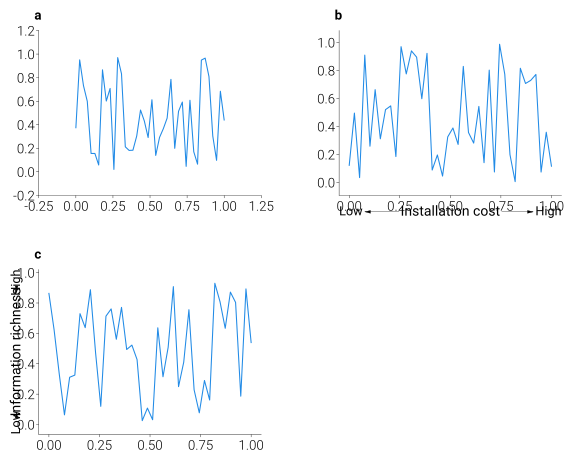
fig, axes = plt.subplots(1, 3, figsize=dm.figsize(dm.col2, 0.35))
for ax in axes:
    ax.plot(np.linspace(0, 1, 40), np.random.rand(40), color='dc.teal3')

# Panel labels
dm.label_axes(axes)  # adds a, b, c

# Layout optimization
dm.simple_layout(fig, ml=0.08, mr=0.05, mb=0.10, mt=0.08)

# Decimal formatting
dm.set_decimal(axes[0], xn=2, yn=1)

# Arrow annotations
dm.arrow_axis(axes[1], 'x', 'Installation cost')
dm.arrow_axis(axes[2], 'y', 'Information richness')
API
Layout Functions
Note
cm2in / set_xmargin / set_ymargin were removed in the 0.4
release. Use dm.cm(...) (which returns a Length) and
matplotlib’s ax.margins(...) instead — see the migration table in
Migration Guide.
- dartwork_mpl.simple_layout(fig: Figure, gs: GridSpecBase | SubplotSpec | None = None, *, margin: Length | str | float = 0, ml: Length | str | float | None = None, mr: Length | str | float | None = None, mt: Length | str | float | None = None, mb: Length | str | float | None = None, use_all_axes: bool = True, adopt_orphan_tick_font: bool | None = None, verbose: bool = False) None[source]
Place axes content at the requested distance from each figure edge.
Walks every visible artist on every axes (texts, title, axis labels, view-limited tick labels, axis offset text, legend) to find the union extent, then computes GridSpec edges so that union sits at
ml/mr/mt/mbfrom the figure edge. Re-measures and re-applies until the GridSpec change between iterations falls below 0.5 px, handling cases where AutoLocator adjusts tick density when the axes is resized (e.g. log scales, large datetime ranges).- Parameters:
fig (Figure) – The figure to lay out.
gs (GridSpec | SubplotSpec | None, optional) – GridSpec or SubplotSpec to update. If
None, the GridSpec offig.axes[0]is used.margin (Length | str | float, optional) – Distance from every figure edge to the axes content. Accepts
Length(dm.cm(0.5)/dm.mm(5)), a unit string ("5mm","0.5cm","0.1in","24pt"), a percentage string ("5%"), or a bare number interpreted as figure-fraction (0.05= 5 %). Default is0—simple_layoutthen snaps axes content flush against the figure edges, which is the same as the historicalauto_layout(fig)minimum-margin behaviour.ml (Length | str | float | None, optional) – Per-side overrides for left / right / top / bottom margins. Each accepts the same forms as
margin.Nonefalls back tomargin.mr (Length | str | float | None, optional) – Per-side overrides for left / right / top / bottom margins. Each accepts the same forms as
margin.Nonefalls back tomargin.mt (Length | str | float | None, optional) – Per-side overrides for left / right / top / bottom margins. Each accepts the same forms as
margin.Nonefalls back tomargin.mb (Length | str | float | None, optional) – Per-side overrides for left / right / top / bottom margins. Each accepts the same forms as
margin.Nonefalls back tomargin.use_all_axes (bool, optional) – If
True(default), every axes in the figure contributes to the measurement. IfFalse, only axes belonging togsare considered.adopt_orphan_tick_font (bool | None, optional) – If
True, tick labels (and offset text) on any axis that has no axis label adopt that axis’s label font (size, weight, family, style; not color), viaadopt_axis_label_font(). Applied each iteration before measurement so the computed margins fit the restyled ticks. Default isNone— the value is read fromdartwork_mpl.config.adopt_orphan_tick_font(itself defaulting toFalse), so setdm.config.adopt_orphan_tick_font = Trueonce to opt in at every call site. PassTrue/Falseexplicitly to override per call.verbose (bool, optional) – If
True, prints per-iteration GridSpec edges and the change since the previous iteration.
Notes
The function returns
None. It is a no-op on figures with no axes.Examples
>>> import matplotlib.pyplot as plt
>>> import dartwork_mpl as dm
>>> dm.style.use("scientific")
>>> fig, ax = plt.subplots(figsize=dm.figsize("13cm", "standard"))
>>> ax.plot([1, 2, 3], [1, 4, 9])
>>> ax.set_xlabel("x")
>>> ax.set_ylabel("y")
>>> dm.simple_layout(fig)                       # margin = 0 (flush)
>>> dm.simple_layout(fig, margin="2%")          # 2% buffer
>>> dm.simple_layout(fig, margin=dm.mm(2))      # 2 mm buffer
>>> dm.simple_layout(fig, ml=dm.cm(1), mr="3%")  # mixed units
Annotation Functions
- dartwork_mpl.make_offset(x: float, y: float, fig: Figure) ScaledTranslation[source]
Create a translation offset transform for positioning figure elements.
- Parameters:
x (float) – Horizontal offset in points.
y (float) – Vertical offset in points.
fig (matplotlib.figure.Figure) – The Figure whose DPI scale is used.
- Returns:
A translation transform that can be added to other transforms.
- Return type:
matplotlib.transforms.ScaledTranslation
- dartwork_mpl.label_axes(axes: list[Axes] | ndarray[Any, Any], labels: list[str] | None = None, fontsize: float | None = None, fontweight: str = 'normal', x: float | str = 'auto', y: float = 1.05, **kwargs: Any) list[Text][source]
Add standardized identification labels (a, b, c, …) to subplot panels.
Commonly used in academic papers and reports to annotate multiple panels of a figure, placing labels at the left edge or top corner of each Axes.
- Parameters:
axes (list[Axes] | np.ndarray) – List or array of Axes objects to label.
labels (list[str] | None, optional) – Custom text labels. If None, lowercase letters (a, b, c, …) are assigned automatically.
fontsize (float | None, optional) – Font size for the labels. If
None(default), resolves tofs(1)so panel labels track the active preset’s base font size instead of a fixed point value.fontweight (str, optional) – Font weight for the labels. Default is “normal”.
x (float | str, optional) – Horizontal position in Axes-relative coordinates (may exceed 0.0-1.0). If “auto”, the optimal x position is determined based on whether a y-axis label is present (-0.18 or -0.02).
y (float, optional) – Vertical position in Axes-relative coordinates. Default is 1.05.
**kwargs – Additional text properties passed to
ax.text().
- Returns:
List of created Text objects.
- Return type:
list
- dartwork_mpl.annotate_value(ax: Axes, x: float, y: float, text: str, *, side: str = 'auto', offset_pt: float = 3.0, fontsize: float | None = None, **kw: Any) Text[source]
Annotate one data value with a compact point-offset label.
side="auto"evaluates above, below, right, then left. Above/below are used only when the rendered label stays inside the axes spine and avoids same-axes data/text. If vertical placement would leave the spine region, the label moves horizontally from the data point instead of flipping to the opposite vertical side. Explicitside="left"/"right"is supported, includingarrowprops; all offsets are single-axis point offsets so arrows remain straight horizontal or vertical connectors.
- dartwork_mpl.annotate_corner(ax: Axes, text: str, *, loc: str = 'upper left', inset_pt: float = 3.0, avoid_overlap: bool = True, fontsize: float | None = None, **kw: Any) Text[source]
Place narrative text tightly inside an axes corner.
The anchor is in axes-fraction coordinates with a point inset toward the plot interior, so multi-line text stays attached to the selected spine corner. With
avoid_overlap=Truethe helper measures rendered data and existing text, then tries corners in upper-left, upper-right, lower-left, lower-right order (starting with an explicitlocwhen provided).
- dartwork_mpl.label_hline(ax: Axes, y: float, text: str, *, x: str | float = 'right', side: str = 'above', gap_pt: float = 2.0, fontsize: float | None = None, **kw: Any) Text[source]
Place a label tightly against a horizontal reference line.
x="left"/"right"attaches to the visible horizontal line endpoint inside the axes;"center"is available when central placement is intentional.x="auto"measures both endpoints and chooses the less obstructed side. Floatxvalues keep the legacy axes-fraction meaning. Vertical movement uses a single-axis point offset so the label stays attached to the reference line rather than drifting diagonally.
- dartwork_mpl.place_legend(ax: Axes, *, loc: str = 'best', **kw: Any) Legend | None[source]
Place or reposition an axes legend.
loc="best"delegates to matplotlib for simple line-only axes. When the axes contains bars/collections/text obstacles or a tall legend, it scores four corners plus upper/lower center across one to three columns and selects the least obstructed in-axes location. The returned Legend receives_dm_collision_freeand_dm_collision_scoreattributes for callers that need to detect an unavoidable collision fallback.
- dartwork_mpl.wrap_axis_label(ax: Axes, axis: str = 'y', max_frac: float = 1.0) bool[source]
Wrap an overlong x/y-axis label to two lines at word boundaries.
The rendered label length is compared with the corresponding axes spine length. Parenthesized or bracketed unit suffixes stay intact and are moved to the second line when wrapping is needed. Returns
Trueonly when the label text changed.
- dartwork_mpl.wrap_axis_labels(fig: Figure | SubFigure, axis: str = 'both', max_frac: float = 1.0) list[Text][source]
Wrap overlong axis labels for every axes in a figure.
axismay be"x","y", or"both". The returned list contains the label Text objects that were changed.
- dartwork_mpl.arrow_axis(ax: Axes, direction: str, label: str, *, offset: float = -0.1, low: str = 'Low', high: str = 'High', fontsize: float | None = None, fontsize_label: float | None = None, pad: float = -0.005, weight: str = 'normal', color: str = 'black', arrow_kw: dict[str, Any] | None = None) None[source]
Draw a bidirectional Low-High arrow axis along the edge of a plot.
Produces a visual like
Low ◄── label ──► Highnear the spine exterior.- Parameters:
ax (Axes) – Target Axes object for the annotation.
direction ({'x', 'y'}) – “x”: insert a horizontal arrow axis below the x-axis spine. “y”: insert a vertical arrow axis to the left of the y-axis spine.
label (str) – Center label text placed at the midpoint of the axis.
offset (float, optional) – Offset from the spine in Axes-fraction units. Default is -0.10 (sufficiently outside to avoid overlap with tick labels).
low (str, optional) – Text for the low end (bottom/left) of the axis. Default is “Low”.
high (str, optional) – Text for the high end (top/right) of the axis. Default is “High”.
fontsize (float | None, optional) – Font size for the Low/High endpoint labels. Default is fs(-1).
fontsize_label (float | None, optional) – Font size for the center label. Default is fs(0).
pad (float, optional) – Fractional gap between text and arrowheads. Default is -0.005.
weight (str, optional) – Font weight applied to all text elements.
color (str, optional) – Color for both text and arrows. Default is “black”.
arrow_kw (dict | None, optional) – Override the arrowprops passed to the internal
ax.annotatecalls.
Utility Functions
- dartwork_mpl.layout.get_bounding_box(boxes: list[Bbox]) tuple[float, float, float, float][source]
Compute the minimum bounding box that encloses all given box regions.
- Parameters:
boxes (list) – List of box objects, each having at minimum p0 (bottom-left coordinate), width, and height attributes.
- Returns:
Overall bounding box as
(min_x, min_y, bbox_width, bbox_height).- Return type:
tuple[float, float, float, float]
- Raises:
ValueError – If
boxesis empty — returning the infinite sentinel tuple would silently poison downstream position math with inf/NaN.
- dartwork_mpl.set_decimal(ax: Axes, xn: int | None = None, yn: int | None = None) None[source]
Fix the number of decimal places displayed on tick labels.
- Parameters:
ax (matplotlib.axes.Axes) – The Axes to modify.
xn (int | None, optional) – Number of decimal places for x-axis tick labels. If None, the x-axis is left unchanged.
yn (int | None, optional) – Number of decimal places for y-axis tick labels. If None, the y-axis is left unchanged.