Note
Go to the end to download the full example code.
Phase Diagrams
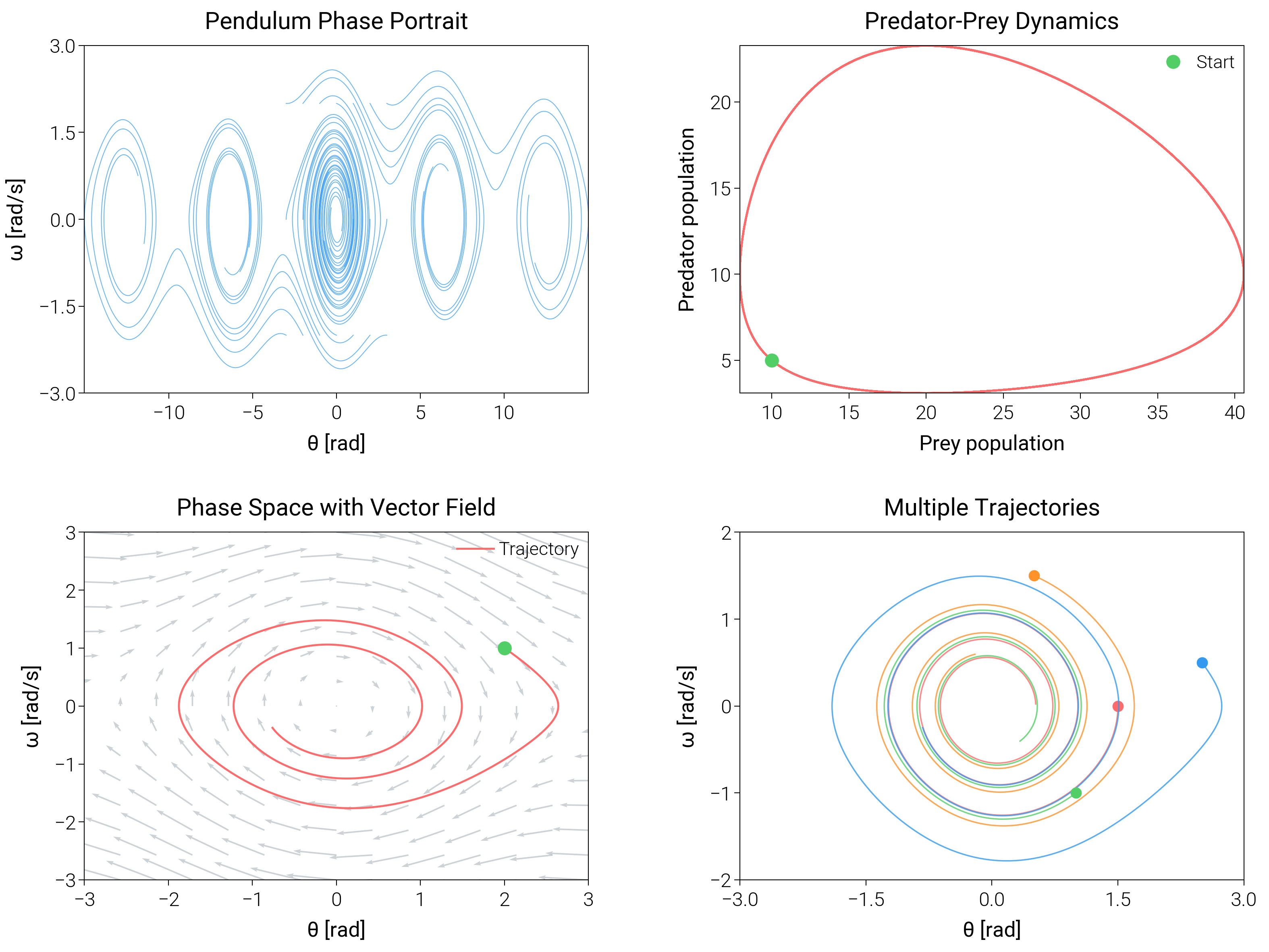
Trace trajectories and vector fields to explain stability and cycles in dynamical systems.
import matplotlib.pyplot as plt
import numpy as np
from scipy.integrate import odeint

import dartwork_mpl as dm

# Apply scientific style preset
dm.style.use("scientific")


# Define dynamical systems
def pendulum(y, t, b, c):
    theta, omega = y
    dydt = [omega, -b * omega - c * np.sin(theta)]
    return dydt


def lotka_volterra(y, t, a, b, c, d):
    x, y_val = y
    dydt = [a * x - b * x * y_val, -c * y_val + d * x * y_val]
    return dydt


# Create figure
fig = plt.figure(figsize=(dm.cm2in(16), dm.cm2in(12)), dpi=300)

# Create GridSpec for 2x2 subplots
gs = fig.add_gridspec(
    nrows=2,
    ncols=2,
    left=0.08,
    right=0.98,
    top=0.95,
    bottom=0.08,
    wspace=0.3,
    hspace=0.4,
)

# Panel A: Simple pendulum phase portrait
ax1 = fig.add_subplot(gs[0, 0])
t = np.linspace(0, 20, 500)
for theta0 in [-3, -2, -1, 0, 1, 2, 3]:
    for omega0 in [-2, 0, 2]:
        y0 = [theta0, omega0]
        sol = odeint(pendulum, y0, t, args=(0.1, 1.0))
        ax1.plot(sol[:, 0], sol[:, 1], color="oc.blue5", lw=0.3, alpha=0.7)
ax1.set_xlabel("θ [rad]", fontsize=dm.fs(0))
ax1.set_ylabel("ω [rad/s]", fontsize=dm.fs(0))
ax1.set_title("Pendulum Phase Portrait", fontsize=dm.fs(1))
ax1.set_xticks([-10, -5, 0, 5, 10])
ax1.set_yticks([-3, -1.5, 0, 1.5, 3])

# Panel B: Predator-Prey (Lotka-Volterra)
ax2 = fig.add_subplot(gs[0, 1])
t_lv = np.linspace(0, 50, 1000)
y0_lv = [10, 5]
sol_lv = odeint(lotka_volterra, y0_lv, t_lv, args=(1.0, 0.1, 1.5, 0.075))
ax2.plot(sol_lv[:, 0], sol_lv[:, 1], color="oc.red5", lw=0.7)
ax2.plot(
    sol_lv[0, 0], sol_lv[0, 1], "o", color="oc.green5", ms=4, label="Start"
)
ax2.set_xlabel("Prey population", fontsize=dm.fs(0))
ax2.set_ylabel("Predator population", fontsize=dm.fs(0))
ax2.set_title("Predator-Prey Dynamics", fontsize=dm.fs(1))
ax2.legend(loc="best", fontsize=dm.fs(-1))

# Panel C: Vector field with trajectory
ax3 = fig.add_subplot(gs[1, 0])
# Create vector field
x_vec = np.linspace(-3, 3, 15)
y_vec = np.linspace(-3, 3, 15)
X, Y = np.meshgrid(x_vec, y_vec)
U = Y
V = -0.1 * Y - np.sin(X)
ax3.quiver(X, Y, U, V, alpha=0.6, width=0.003, scale=30, color="oc.gray5")
# Add trajectory
t_traj = np.linspace(0, 20, 500)
y0_traj = [2, 1]
sol_traj = odeint(pendulum, y0_traj, t_traj, args=(0.1, 1.0))
ax3.plot(
    sol_traj[:, 0], sol_traj[:, 1], color="oc.red5", lw=0.7, label="Trajectory"
)
ax3.plot(sol_traj[0, 0], sol_traj[0, 1], "o", color="oc.green5", ms=4)
ax3.set_xlabel("θ [rad]", fontsize=dm.fs(0))
ax3.set_ylabel("ω [rad/s]", fontsize=dm.fs(0))
ax3.set_title("Phase Space with Vector Field", fontsize=dm.fs(1))
ax3.legend(loc="best", fontsize=dm.fs(-1))
ax3.set_xlim(-3, 3)
ax3.set_ylim(-3, 3)

# Panel D: Multiple trajectories
ax4 = fig.add_subplot(gs[1, 1])
colors = ["oc.red5", "oc.blue5", "oc.green5", "oc.orange5"]
initial_conditions = [[1.5, 0], [2.5, 0.5], [1.0, -1], [0.5, 1.5]]
for ic, color in zip(initial_conditions, colors, strict=False):
    sol = odeint(pendulum, ic, t, args=(0.1, 1.0))
    ax4.plot(sol[:, 0], sol[:, 1], color=color, lw=0.5, alpha=0.8)
    ax4.plot(ic[0], ic[1], "o", color=color, ms=3)
ax4.set_xlabel("θ [rad]", fontsize=dm.fs(0))
ax4.set_ylabel("ω [rad/s]", fontsize=dm.fs(0))
ax4.set_title("Multiple Trajectories", fontsize=dm.fs(1))
ax4.set_xticks([-3, -1.5, 0, 1.5, 3])
ax4.set_yticks([-2, -1, 0, 1, 2])

# Optimize layout
dm.simple_layout(fig, gs=gs)

# Save and show plot
plt.show()
Total running time of the script: (0 minutes 2.093 seconds)