Font Families
dartwork-mpl bundles 262 text font files across 22 documented file groups. Matplotlib registers those assets as 20 matplotlib family names; Condensed and SemiCondensed Noto Sans files register as Noto Sans with width metadata rather than separate family names. Each group is optimized for different use cases in data visualization. This page profiles the core groups in depth; for a one-click specimen of every family — including Pretendard, Source Sans 3, IBM Plex Sans, the serif faces Source Serif 4, Noto Serif, and IBM Plex Serif, and the monospace families (JetBrains Mono, D2Coding, IBM Plex Mono, Source Code Pro, Roboto Mono) — use the font browser.
Why fonts matter
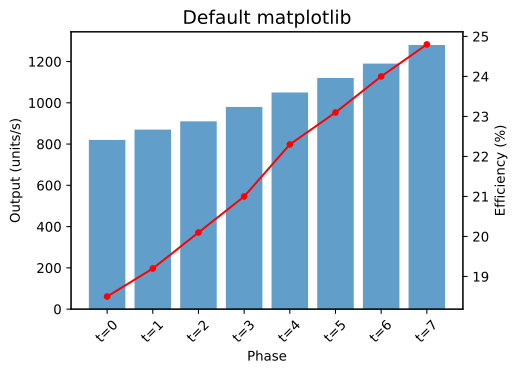
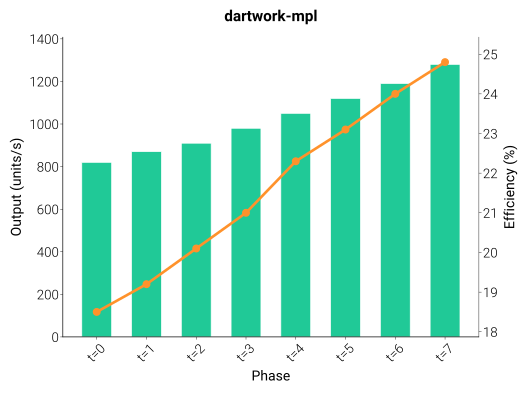
The right typeface can transform a chart from amateur to professional. Here’s the same data plotted with default matplotlib fonts (left) and dartwork-mpl fonts (right):
Compare — default matplotlib (top) vs dartwork-mpl (bottom):
Role System
Pick fonts by role first, then by voice. The registry gives every bundled matplotlib family one job, and the measured rationale explains why those jobs exist: Design rationale › Typography.
Role |
Default |
Alternates |
When to pick |
|---|---|---|---|
body |
Roboto |
Inter · IBM Plex Sans · Source Sans 3 · Noto Sans |
General Latin chart text; choose an alternate for screen UI, technical, editorial, or multilingual tone. |
display |
Inter Display |
- |
Titles, section headings, and poster-scale numbers. |
kr-body |
Paperlogy |
Pretendard · Noto Sans CJK KR |
Korean labels and bilingual KR/EN figures; use Noto Sans CJK KR when broader CJK coverage matters. |
serif |
Source Serif 4 |
Noto Serif · IBM Plex Serif |
Opt-in serif body for journal- or book-matched figures. Not wired into any preset chain, so set the chosen serif in |
mono |
JetBrains Mono |
IBM Plex Mono · Roboto Mono · Source Code Pro |
Code, timestamps, aligned values, and tabular labels; pair alternates with their sans siblings. |
mono-kr |
D2Coding |
- |
Monospaced Hangul for code blocks and aligned Korean tables. Pair with the Latin mono as |
fallback-tail |
Noto Sans Math |
Noto Sans Symbols · Noto Sans Symbols 2 |
Keep these in the chain for math operators, arrows, signs, and dingbats rather than choosing them as body faces. |
To apply a font, prepend its exact matplotlib family name to the current
font.family chain (e.g. Inter Display with a space, not InterDisplay).
For documented file groups whose name is not a separate family
(Noto Sans Condensed, Noto Sans SemiCondensed), use the bundled styles or
the Noto Sans family plus width-aware styling. Keep the rest of the chain so
Korean, CJK, math, and symbol fallback still work:
import matplotlib.pyplot as plt

family_chain = plt.rcParams["font.family"]
plt.rcParams["font.family"] = [
    "Inter",
    *[family for family in family_chain if family != "Inter"],
]  # or any family name from the table
Fine-tune size and weight next → Font Utilities › Custom Font Configuration.
For numeric-heavy axes, prefer families whose default digits are already
uniform in matplotlib (Roboto, IBM Plex Sans, Source Sans 3, Paperlogy,
Noto Sans, Source Serif 4, Noto Serif, IBM Plex Serif, or the monospace
families). Inter and Pretendard expose browser OpenType tnum, but
matplotlib does not apply that feature, so their real plot digits remain
proportional.
Fonts in Chart Context
Each role appears in chart context. This annotated example shows which family is used where:
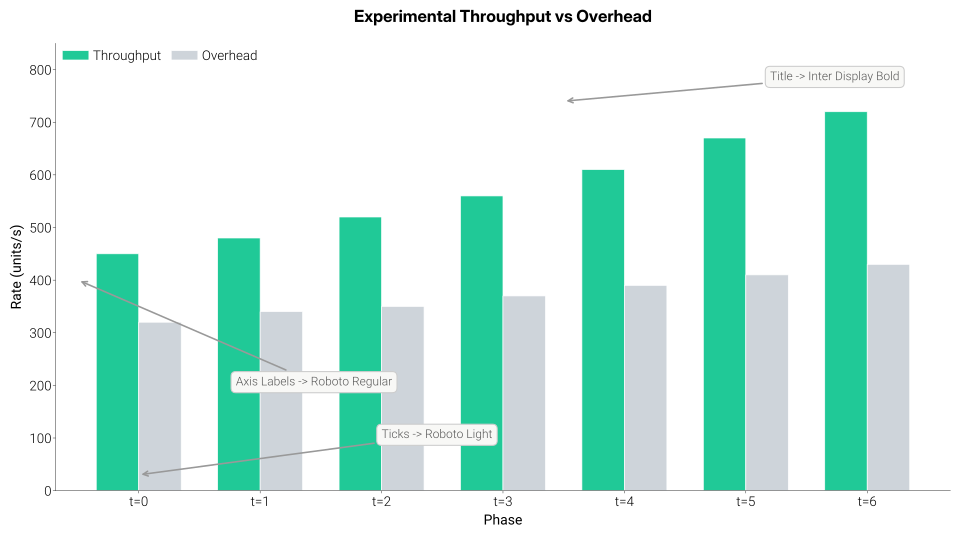
Title uses Inter Display Bold for maximum impact. Axis labels use Roboto Regular for clear identification. Tick marks use Roboto Light for unobtrusive readability.
Role-Based Pairing
Start from the default role stack, then swap within a role only when the chart needs a different voice:
Need |
Pairing |
|---|---|
Default publication chart |
Inter Display titles · Roboto labels · fallback tail intact |
Screen dashboard |
Inter Display titles · Inter labels · JetBrains Mono for code or aligned values |
Technical report |
Inter Display titles · IBM Plex Sans labels · IBM Plex Mono snippets |
Editorial captions |
Inter Display titles · Source Sans 3 captions · Source Code Pro code |
Korean report |
Paperlogy titles and labels · Pretendard alternate for KR/EN interface tone |
Size Scale
Common size ranges used in charts, mapped to fs() offsets:
Role |
Typical pt |
|
Notes |
|---|---|---|---|
Tick labels |
5.5–7 |
|
Keep light (300) for minimal distraction |
Axis labels |
7.5–10.5 |
|
Base size — matches the active preset |
Legend |
5.5–9 |
|
Smaller than axis labels |
Subtitles |
9–13 |
|
Medium weight (500) adds hierarchy |
Titles |
8.5–14 |
|
Use Inter Display or bold weight for impact |
Multi-Language Support
All fonts below are bundled — no system font installation required:
Multi-Language Support
All rendered with bundled fonts — no system font installation required
Font Family Details
Every specimen below is rendered live in your browser using the actual bundled font files — no images, no placeholders.
Roboto (Default)
Roboto
Google's flagship sans-serif, default font in dartwork-mpl · 9 weights + 9 italics
Google’s flagship sans-serif typeface and the default font in dartwork-mpl. Roboto features friendly, open curves while maintaining a mechanical skeleton, making it highly legible at all sizes.
Author: Christian Robertson · License: OFL 1.1
All weights
Roboto
Google's flagship sans-serif, default font in dartwork-mpl
Inter
Inter
Modern, highly legible sans-serif designed for computer screens · 9 weights + 9 italics
A modern sans-serif typeface designed specifically for computer screens. Inter features a tall x-height for improved readability at small sizes and includes many OpenType features.
Author: Rasmus Andersson · License: OFL 1.1
All weights
Inter
Modern, highly legible sans-serif designed for computer screens
Inter Display
InterDisplay
Display variant of Inter optimized for larger sizes · 9 weights + 9 italics
The display variant of Inter, optimized for larger sizes. Features tighter letter-spacing and refined details that shine at headline sizes.
Author: Rasmus Andersson · License: OFL 1.1
All weights
InterDisplay
Display variant of Inter optimized for larger sizes
Noto Sans
NotoSans
Google's versatile sans-serif with excellent language coverage · 9 weights + 9 italics
Google’s Noto Sans provides harmonious typography across hundreds of languages. The name “Noto” comes from “No Tofu”—the goal of eliminating the blank boxes (tofu) that appear when a font lacks a glyph.
Author: Google · License: OFL 1.1
All weights
NotoSans
Google's versatile sans-serif with excellent language coverage
Condensed Variants
The Noto Sans family includes three condensed variants. Choose based on how much horizontal space you need to save:
Condensed Variants Comparison
Same text rendered at four widths — choose based on available space
Noto Sans Condensed
NotoSans_Condensed
Condensed variant of Noto Sans for space-constrained layouts · 9 weights + 9 italics
All weights
NotoSans_Condensed
Condensed variant of Noto Sans for space-constrained layouts
Noto Sans SemiCondensed
NotoSans_SemiCondensed
Semi-condensed variant balancing readability and compactness · 9 weights + 9 italics
All weights
NotoSans_SemiCondensed
Semi-condensed variant balancing readability and compactness
Noto Sans Math
NotoSansMath
Mathematical symbols and equations font
A dedicated font for mathematical typesetting. Provides comprehensive coverage of mathematical symbols, operators, and special characters.
Variants: 1 (Regular only)
Author: Google · License: OFL 1.1
Paperlogy
Paperlogy
Clean, professional font designed for documents · Korean (한글) support · 9 weights
A clean, professional typeface designed for documents. Paperlogy offers excellent readability in dense text environments. Includes full Korean (한글) glyph support.
Author: Freesentation · License: OFL 1.1
All weights
Paperlogy
Clean, professional font designed for documents · Korean (한글) support
Pretendard
Pretendard
Modern geometric-humanist sans · full Korean (한글) support · 9 weights
A modern geometric-humanist sans-serif with comprehensive Korean (한글) and Latin coverage, drawing on the proportions of contemporary system-UI typefaces. Pretendard keeps its clarity from caption to display sizes, which makes it a natural first choice for bilingual Korean–English reports and dashboards. Full Korean (한글) glyph support across nine weights (Thin → Black).
Author: Kil Hyungjin (길형진) · License: OFL 1.1
All weights
Pretendard
Modern geometric-humanist sans · full Korean (한글) support
Font Weight Reference
Weight Name |
Numeric Value |
Description |
|---|---|---|
Thin |
100 |
Extremely light |
ExtraLight |
200 |
Very light |
Light |
300 |
Light (dartwork default) |
Regular |
400 |
Normal |
Medium |
500 |
Slightly bold |
SemiBold |
600 |
Semi-bold |
Bold |
700 |
Bold |
ExtraBold |
800 |
Extra bold |
Black |
900 |
Maximum weight |
Using Weights:
import dartwork_mpl as dm

dm.style.use("scientific")  # Base weight = 300 (Light)

# Use the fw() helper for relative weight adjustments
ax.set_title("Title", fontweight=dm.fw(4))   # 300 + 400 = 700 (Bold)
ax.set_xlabel("Label", fontweight=dm.fw(0))  # 300 (base, Light)