Font Utilities
dartwork-mpl provides helper functions and automatic font registration to simplify typography management in your visualizations.
Just want to switch the active font family? Jump to Custom Font Configuration. This page otherwise covers the
fs()/fw()sizing helpers and automatic registration.
API signatures: See API Reference › Font Utilities for the concise API listing and autodoc output.
Automatic Font Registration
When you import dartwork-mpl, all 262 bundled fonts are automatically registered with matplotlib’s font manager — no manual installation or system-level configuration required:
import dartwork_mpl as dm # Fonts are now available!
Interactive Utilities Playground
ax.set_title("Sample Text", fontsize=dm.fs(2), fontweight=dm.fw(1))fs(n) — Font Size Helper
Adjusts font size relative to the current base size from your active style. This keeps your typography consistent when switching between presets or output formats.
Signature:
dm.fs(n)
Parameters:
n(int/float): Points to add to the base font size
Returns:
float: The adjusted font size
Example:
import dartwork_mpl as dm
import matplotlib.pyplot as plt

dm.style.use("scientific")  # Base font size is 7.5

fig, ax = plt.subplots()
ax.set_title("Main Title", fontsize=dm.fs(6))      # 13.5pt
ax.set_xlabel("X Label", fontsize=dm.fs(2))        # 9.5pt
ax.set_ylabel("Y Label", fontsize=dm.fs(0))        # 7.5pt (base)
ax.text(0.5, 0.5, "Note", fontsize=dm.fs(-2))      # 5.5pt
Why use fs() instead of hardcoded sizes? If you switch from scientific
(base 7.5pt) to presentation (base 10.5pt), all your fs() calls
automatically adjust — no manual updates needed:
# This adapts automatically to any preset:
ax.set_title("Title", fontsize=dm.fs(4))  # Always 4pt larger than base

# This breaks when you change presets:
ax.set_title("Title", fontsize=14)  # Wrong size for scientific, right for presentation?
fw(n) — Font Weight Helper
Adjusts font weight relative to the current base weight from your active style. Each step corresponds to one standard weight increment (100).
Signature:
dm.fw(n)
Parameters:
n(int): Weight steps to add (each step = 100)
Returns:
int: The adjusted font weight
Example:
import dartwork_mpl as dm
import matplotlib.pyplot as plt

dm.style.use("scientific")  # Base weight is 300 (Light)

fig, ax = plt.subplots()
ax.set_title("Bold Title", fontweight=dm.fw(4))    # 700 (Bold)
ax.set_xlabel("Medium Label", fontweight=dm.fw(2)) # 500 (Medium)
ax.set_ylabel("Light Label", fontweight=dm.fw(0))  # 300 (Light, base)
ax.text(0.5, 0.5, "Thin", fontweight=dm.fw(-2))    # 100 (Thin)
Weight Scale Reference:
|
Result |
Weight Name |
|---|---|---|
|
100 |
Thin |
|
200 |
ExtraLight |
|
300 |
Light (base) |
|
400 |
Regular |
|
500 |
Medium |
|
600 |
SemiBold |
|
700 |
Bold |
|
800 |
ExtraBold |
|
900 |
Black |
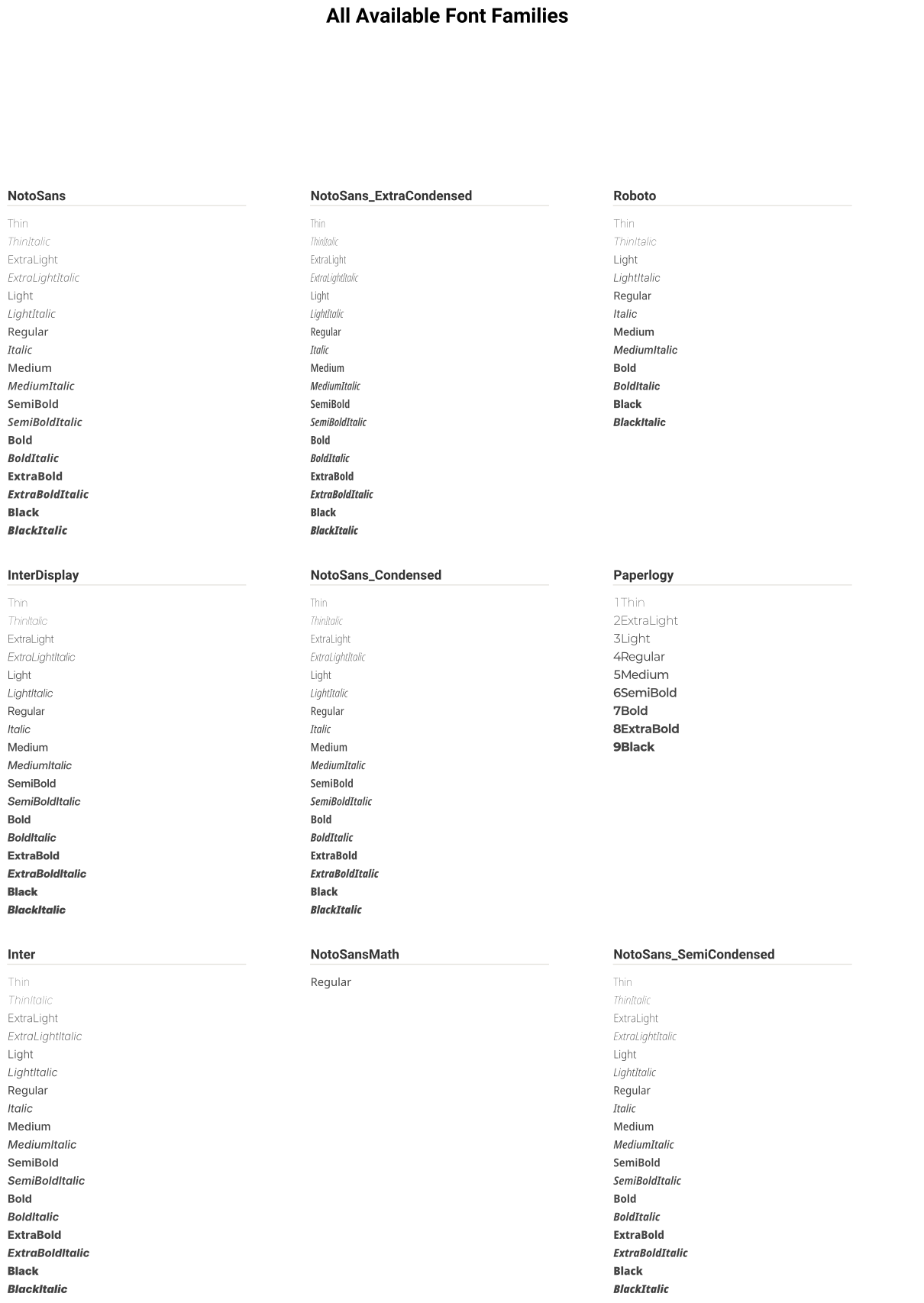
plot_fonts() — Font Preview Gallery
Generates a visual preview of all available fonts.
Signature:
dm.plot_fonts(font_dir=None, ncols=2, font_size=11)
Parameters:
font_dir(str, optional): Directory containing.ttffiles. Defaults to the bundled fonts.ncols(int): Number of columns in the preview grid. Default: 2font_size(int): Sample text size in points. Default: 11
Returns:
matplotlib.figure.Figure: The preview figure
Example:
import dartwork_mpl as dm
import matplotlib.pyplot as plt

# Preview bundled fonts
fig = dm.plot_fonts(ncols=3, font_size=12)
plt.show()

# Preview custom fonts
fig = dm.plot_fonts(font_dir="/path/to/custom/fonts", ncols=2)
plt.savefig("custom_fonts.png", dpi=150)
Style Configuration
dartwork-mpl styles configure fonts through matplotlib’s rcParams:
Default Font Settings (dmpl style)
# Font family and weight
font.family: roboto
font.weight: 300

# Base font size
font.size: 7.5

# Math text configuration
mathtext.fontset: custom
mathtext.rm: Noto Sans Math
mathtext.it: Noto Sans Math:italic
mathtext.bf: Noto Sans Math:bold
mathtext.cal: Noto Sans Math
mathtext.sf: Noto Sans Math
mathtext.tt: Noto Sans Math
Applying Styles
import dartwork_mpl as dm

# Apply a preset (recommended)
dm.style.use("scientific")
dm.style.use("presentation")
Custom Font Configuration
Override defaults for specific needs:
import matplotlib.pyplot as plt
import dartwork_mpl as dm

dm.style.use("scientific")

# Change primary font family while preserving fallback coverage
family_chain = plt.rcParams["font.family"]
plt.rcParams["font.family"] = [
    "Inter",
    *[family for family in family_chain if family != "Inter"],
]

# Change base weight
plt.rcParams['font.weight'] = 400  # Regular instead of Light

# Change base size
plt.rcParams['font.size'] = 10
Tips and Best Practices
Consistent Typography Hierarchy
Use fs() to create a consistent sizing hierarchy:
# Define your hierarchy
TITLE_SIZE = dm.fs(6)
SUBTITLE_SIZE = dm.fs(3)
LABEL_SIZE = dm.fs(0)
ANNOTATION_SIZE = dm.fs(-2)

# Apply consistently
ax.set_title("Main Title", fontsize=TITLE_SIZE)
ax.text(0.5, 0.95, "Subtitle", fontsize=SUBTITLE_SIZE, transform=ax.transAxes)
ax.set_xlabel("X Axis", fontsize=LABEL_SIZE)
Emphasis with Weight
Use weight for emphasis instead of color when possible:
ax.set_title("Important Finding", fontweight=dm.fw(4))  # Bold
ax.set_xlabel("Supporting Label", fontweight=dm.fw(0))  # Light
Condensed Fonts for Tight Spaces
Switch to condensed variants when space is limited:
# For crowded tick labels
ax.tick_params(axis='x', labelsize=dm.fs(-1))
for label in ax.get_xticklabels():
    label.set_fontfamily('Noto Sans Condensed')
Math Text
Use raw strings with LaTeX-style notation:
ax.set_xlabel(r'$\alpha$ (radians)')
ax.set_ylabel(r'$\sin(\alpha)$')
ax.set_title(r'$y = \sum_{i=1}^{n} x_i$')