Color Space
dartwork-mpl provides a powerful Color class for working with colors in
different color spaces. If you’ve ever mixed two colors and gotten a muddy
brown, or built a gradient that dips through gray — that’s because most tools
work in RGB, which doesn’t match how humans perceive color.
dartwork-mpl solves this by using OKLab and OKLCH — perceptually uniform color spaces where equal numeric distances correspond to equal visual differences. This page covers:
Creating Color objects from any format
Converting between color spaces
Modifying individual color channels
Interpolating smooth gradients (and why the color space matters)
Building custom colormaps for matplotlib
Why color spaces matter
Traditional RGB mixes colors the way a screen does — by blending light channels. That’s convenient for hardware but terrible for human perception. Two colors that are numerically “equidistant” in RGB can look wildly different to the eye.
Perceptually uniform spaces like OKLab and OKLCH fix this. They model how humans actually see color, so operations like blending, lightening, and interpolating produce predictable and visually pleasing results.
Tip
If you’re new to color spaces, don’t worry about the math — dartwork-mpl handles all conversions automatically. Just pick the constructor that matches your input format, and use OKLCH when you need to adjust hue or saturation.
Color object
The Color class is a unified interface for working with colors across
multiple color spaces. Internally, colors are stored as OKLab coordinates,
which enables efficient and accurate conversions.
import dartwork_mpl as dm

# All Color objects are stored internally as OKLab
color = dm.oklab(0.7, 0.1, 0.2)
print(color)  # Color(oklab=(0.7000, 0.1000, 0.2000))
View objects (color.oklab, color.oklch, color.rgb) provide
convenient attribute-based access for reading, writing, unpacking, and
indexing color components.
Creating Color objects
You can create Color objects from any supported format. Pick whichever matches
your input — all methods produce identical Color instances that can be
freely converted.
From OKLab coordinates
import dartwork_mpl as dm

# L: lightness (0–1), a: green↔red, b: blue↔yellow
color = dm.oklab(0.7, 0.1, 0.2)
From OKLCH coordinates
import dartwork_mpl as dm

# L: lightness (0–1), C: chroma (≥0), h: hue in degrees (0–360)
color = dm.oklch(0.7, 0.2, 120)  # Greenish color
OKLCH uses degrees for hue, making it intuitive: 0° = red, 120° = green, 240° = blue. This is the most natural space for adjusting saturation (chroma) and hue independently.
From RGB values
import dartwork_mpl as dm

# Automatically detects range: 0–1 or 0–255
color1 = dm.rgb(0.8, 0.2, 0.3)    # 0–1 range (common in matplotlib)
color2 = dm.rgb(200, 50, 75)      # 0–255 range (auto-detected)
From hex strings
import dartwork_mpl as dm

color1 = dm.hex("#ff5733")
color2 = dm.hex("#f73")  # Short format also supported
From matplotlib color names
import dartwork_mpl as dm

# Works with any matplotlib color name
color1 = dm.color("red")
color2 = dm.color("dc.ocean2")      # OpenColor palette
color3 = dm.color("tw.blue500")    # Tailwind colors
Color space conversion
Once you have a Color object, convert it to any supported space. Pick the method that suits your workflow.
Using conversion methods
import dartwork_mpl as dm

color = dm.hex("#ff5733")

# Returns tuples
L, a, b = color.to_oklab()        # OKLab coordinates
L, C, h = color.to_oklch()        # OKLCH (h in degrees)
r, g, b = color.to_rgb()          # RGB (0–1 range)
hex_str = color.to_hex()          # Hex string
Using view objects (recommended)
View objects provide attribute-based access with both reading and writing:
import dartwork_mpl as dm

color = dm.hex("#ff5733")

# Attribute access
L = color.oklab.L
a = color.oklab.a

# Unpacking
L, a, b = color.oklab
L, C, h = color.oklch
r, g, b = color.rgb

# Index access
a = color.oklab[1]  # Same as color.oklab.a
Try it live: Pick any color below to see its values across all four color spaces in real time.
### Modifying color componentsView objects support direct modification — changes in any space are automatically synced back to the internal OKLab representation:
import dartwork_mpl as dm

color = dm.oklab(0.7, 0.1, 0.2)

# Direct assignment
color.oklab.L = 0.8

# Arithmetic operations
color.oklab.L += 0.1    # Increase lightness
color.oklab.a -= 0.05   # Shift toward green

# OKLCH modifications (most intuitive for designers)
color.oklch.C += 0.1    # More saturated
color.oklch.h += 30     # Rotate hue by 30°

# RGB modifications
color.rgb.r = 0.9       # Set red channel
Copying colors
Use copy() to create an independent clone. Without it, modifications would
affect the original:
import dartwork_mpl as dm

color = dm.oklch(0.7, 0.2, 120)
brighter = color.copy()
brighter.oklab.L += 0.1  # original is unchanged

print(color.oklab.L)      # 0.7
print(brighter.oklab.L)   # 0.8
Color space overview
Space |
Type |
Components |
Best for |
|---|---|---|---|
OKLab |
Cartesian |
L (lightness), a, b |
Blending, interpolation, color math |
OKLCH |
Polar |
L, C (chroma), h (hue°) |
Adjusting saturation/hue independently |
RGB |
Device |
r, g, b (0–1) |
Display output, matplotlib compatibility |
Hex |
String |
|
CSS, web, copy-paste |
Tip
When should I use which?
OKLCH for creative work — it’s the most intuitive for adjusting how vivid (chroma) or what shade (hue) a color is.
OKLab for programmatic operations — blending, distance calculations, and interpolation.
RGB/Hex mainly for output — passing colors to matplotlib or the web.
Color interpolation with cspace
The cspace() function generates smooth color gradients by interpolating
between two colors in a specified color space. Think of it as np.linspace
for colors.
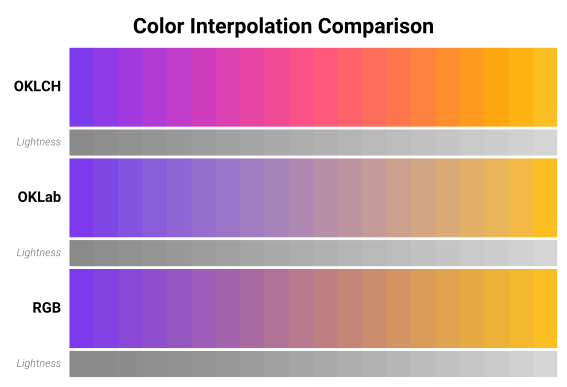
Why does the color space matter? Try the demo below with the default purple → yellow pair. Notice how:
RGB produces a muddy gray-brown in the middle (the “dead zone”)
OKLab stays smooth but can look washed out
OKLCH maintains vivid hues throughout — it takes the scenic route around the color wheel
import dartwork_mpl as dm

dm.style.use("scientific")

# Interpolate in OKLCH (default, perceptually uniform)
colors_oklch = dm.cspace("#ff5733", "#33ff57", n=10, space="oklch")

# Interpolate in OKLab
colors_oklab = dm.cspace("#ff5733", "#33ff57", n=10, space="oklab")

# Interpolate in RGB (often produces muddy midpoints)
colors_rgb = dm.cspace("#ff5733", "#33ff57", n=10, space="rgb")
The function accepts Color objects or hex strings:
import dartwork_mpl as dm

start = dm.color("dc.ocean2")
end = dm.hex("#ff5733")
gradient = dm.cspace(start, end, n=20, space="oklch")
Creating custom colormaps
Use cspace() to build custom matplotlib colormaps with smooth,
perceptually uniform transitions. This is far superior to manually
specifying color stops in RGB.
Try it live: Build your own colormap below. Toggle between Sequential and Diverging modes, pick your colors, and copy the generated Python code.
colors = dm.cspace("#1A237E", "#FF6F00", n=256, space="oklch")Sequential colormaps
A sequential colormap ramps from one color to another — ideal for magnitude, density, or probability maps:
import dartwork_mpl as dm
import matplotlib.pyplot as plt
import matplotlib.colors as mcolors
import numpy as np

dm.style.use("scientific")

# Create a custom sequential colormap
colors = dm.cspace("#1a237e", "#ff6f00", n=256, space="oklch")
cmap = mcolors.ListedColormap([c.to_rgb() for c in colors],
                               name="custom_blue_orange")

# Use it in a plot
fig, ax = plt.subplots(figsize=dm.figsize("15cm", "9cm"))
data = np.random.randn(100, 100)
im = ax.imshow(data, cmap=cmap)
plt.colorbar(im, ax=ax, label="Value")
dm.simple_layout(fig)
Diverging colormaps
For data with a meaningful midpoint (e.g., positive vs. negative), create a diverging colormap by interpolating through a neutral center:
import dartwork_mpl as dm
import matplotlib.colors as mcolors

# Diverging: blue → white → red
colors1 = dm.cspace("#1a237e", "#ffffff", n=128, space="oklch")
colors2 = dm.cspace("#ffffff", "#c62828", n=128, space="oklch")
colors = colors1[:-1] + colors2  # Remove duplicate white
cmap_div = mcolors.ListedColormap([c.to_rgb() for c in colors],
                                   name="custom_diverging")
Registering colormaps
To make your custom colormap available globally in your session:
import matplotlib as mpl

mpl.colormaps.register(cmap=cmap)
# Now you can use it anywhere: plt.imshow(data, cmap="custom_blue_orange")
Quick reference
Task |
Code |
|---|---|
Create from OKLab |
|
Create from OKLCH |
|
Create from RGB |
|
Create from hex |
|
Create from name |
|
Convert to tuple |
|
Convert to hex |
|
Read/write components |
|
Copy |
|
Interpolate |
|
See also
Colors — full named palette catalog
Colormaps — predefined colormap collections with design philosophy
Usage Guide › Colors — practical color usage and mixing
API › Color Utilities for all color functions