Font Utilities
Custom fonts bundled in asset/font are registered with matplotlib on import,
so they are available without manual configuration. Scaling helpers fs,
fw, and lw offset the global rcParams base values; plot_fonts
previews every installed family.
Tip
For detailed usage examples, weight reference tables, and best practices see Font Utilities.
Quick API
fs(n) — font size + n points.
fw(n) — font weight + 100×*n* (string weights auto-converted).
lw(n) — line width + n.
plot_fonts(font_dir=None, ncols=3, font_size=11)— returns a
Figurewith a preview grid of all available families.
Example
import matplotlib.pyplot as plt
import dartwork_mpl as dm

fig, ax = plt.subplots()
ax.set_title("Paper-ready", fontsize=dm.fs(2), fontweight=dm.fw(1))
ax.plot(x, y, lw=dm.lw(0.5))       # base linewidth + 0.5
dm.plot_fonts(ncols=4, font_size=12)  # inspect available families
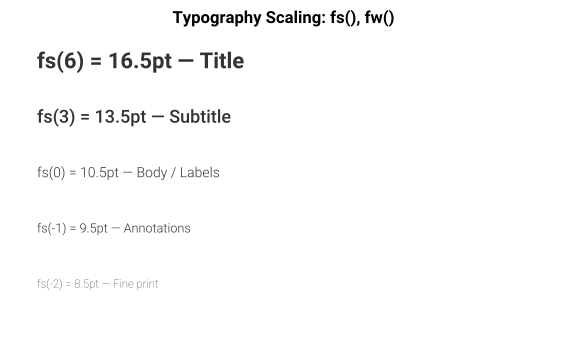
Font management utilities for Matplotlib.
Registers custom fonts from the package’s asset/font directory with matplotlib’s internal font manager.
- class dartwork_mpl.font.FontFamily(name: str, role: Literal['body', 'display', 'kr-body', 'serif', 'mono', 'mono-kr', 'fallback-tail'], job: str, alternates: tuple[str, ...] = (), quirks: tuple[str, ...] = (), weight_exceptions: tuple[int, ...] = ())[source]
Bases:
objectCurated job record for a bundled matplotlib font family.
- alternates: tuple[str, ...] = ()
- property chart_glyphs: tuple[str, ...]
- property hangul: bool
- property italic: bool
- job: str
- property licenses: tuple[str, ...]
- property mono: bool
- name: str
- property numeric_axes: bool
- quirks: tuple[str, ...] = ()
- role: Literal['body', 'display', 'kr-body', 'serif', 'mono', 'mono-kr', 'fallback-tail']
- property tnum: bool
- property tnum_available: bool
- weight_exceptions: tuple[int, ...] = ()
- property weights: tuple[int, ...]
- dartwork_mpl.font.css_font_face_name(font_file: str | Path) str[source]
Return the CSS
@font-facefamily name for a bundled font file.
- dartwork_mpl.font.ensure_loaded() None[source]
Ensure custom fonts are loaded and registered.
Thread-safe: uses double-checked locking to avoid duplicate font registration when called concurrently from multiple threads.
- dartwork_mpl.font.font_families() Mapping[str, FontFamily][source]
Return the curated bundled-font family registry.
- dartwork_mpl.font.list_registered() list[str][source]
Return sorted bundled font family names registered in matplotlib.
- dartwork_mpl.fs(n: int | float) float[source]
Return the base font size plus n.
- Parameters:
n (int | float) – Offset to add to
rcParams['font.size']. Positive values increase, negative values decrease.- Returns:
Scaled font size.
- Return type:
float
- dartwork_mpl.fw(n: int | float) int[source]
Return the base font weight plus 100 * n.
String weight names (e.g.,
'normal','bold') are automatically converted to their numeric equivalents (e.g., 400, 700) before computation.- Parameters:
n (int | float) – Number of weight steps to add (each step = 100). For example, n=1 selects one step bolder than the base weight. Fractional steps are allowed but the result is rounded to an int, since matplotlib font weights are integers (0-1000).
- Returns:
Computed numeric font weight (always an
int— a fractionalnis rounded, so the-> intcontract holds).- Return type:
int