Colormaps
Use this page when numeric values should become colors.
A colormap turns numeric values into colors. Use color= when one plot
element needs one color token; use cmap= when numeric values should select
colors from a map.
Quick start
import dartwork_mpl as dm
import matplotlib.pyplot as plt
import numpy as np

dm.style.use("scientific")
data = np.random.randn(50, 50).cumsum(axis=0)
im = plt.imshow(data, cmap="dc.aurora")          # the default multi-hue map
cb = plt.colorbar(im, extend="both", shrink=0.9, pad=0.02)
cb.set_label("normalized signal")
cb.outline.set_visible(False)
plt.show()
Reach any map by name in
cmap=:cmap="dc.blue",cmap="dc.blue_red".Fetch the
Colormapobject withplt.colormaps["dc.aurora"].Registered continuous maps have
_rvariants such asdc.aurora_randdc.blue_red_r.Reverse qualitative colors with
dm.colors(..., reverse=True).
Choosing a map
For forward/default registrations:
Single-hue sequential: low values are light and high values are dark.
Multi-hue sequential: low values are dark and high values are light.
Diverging: two poles around a light center; no one monotonic low-to-high direction applies.
Cyclic: no low/high direction; the generating path closes, as with 0° and 360°.
Qualitative: unordered categories rather than numeric values.
_rswaps the endpoint assignment for a registered continuous map.
Your data |
Reach for |
|---|---|
One magnitude / density |
a single-hue map ( |
A heatmap that needs maximum resolution |
a multi-hue map ( |
Signed values / anomalies around zero |
a diverging map ( |
Angle / phase (0° = 360°) |
a cyclic map ( |
Discrete classes |
|
ΔEOK is a color-distance ruler: larger means more different. Its coefficient of variation (CV) describes how much neighboring distance changes; lower CV means more even neighboring steps.
aurora is the default heatmap map. Against viridis, its
ΔEOK cv 0.063 vs 0.086 is lower under an identical 32-stop sample of each
shipped 256-entry lookup table (LUT). This is a bounded same-protocol benchmark
of neighbor-step variation; it does not prove universal perceptual uniformity.
The warm multi-hue maps divide the work: afterglow runs through magenta
(plasma-like), blaze starts in dark violet (magma-like), and lava never
touches violet at all — a designed alternative to matplotlib’s hot.
Why not just use viridis?
viridis is excellent — but it is one map. Publication figures need a
family: single-hue ramps for density, multi-hue ramps for heatmaps,
diverging scales for signed values, cyclic maps for phase, all sharing the
same perceptual integrity. Standard matplotlib maps (viridis, Blues,
tab10, …) keep working without any prefix; the dc. prefix reaches the
dartwork set (and avoids collisions with matplotlib’s own pink/gray
maps — the same convention as cmocean’s cmo. and Crameri’s cmc.).
The dartwork set adds what one map cannot. OKLab and OKLCH are used to construct
and adjust colors. Modeled relative CIE Y (relative_y) is calculated from
nominal D65 sRGB; it is not a measurement of a particular display, perceived
brightness, or OKLab L. A modeled-relative-Y ordering check keeps each
sequential map on its required path. CIEDE2000 and the named
CVD simulations are model-specific collision/regression diagnostics on
finished output, not construction inputs; CIEDE2000 distance is reported as
ΔE00. Together with measured ΔEOK step consistency, these are bounded catalog
checks rather than a claim of perfect perceptual uniformity; their distinct
evidence sources are listed in Validation.
The catalog
Explore the 43-map continuous v5 catalog.
The output below is preserved exactly by the v6 compiler. Pick a map on the left; the true gradient strip, model-diagnostic chips, and the demo plots on the right re-render live. Drag Levels to quantize, toggle Reverse / B&W, switch the demo grid layout, and pick which of the 16 demo types to show.
The continuous set is 43 maps in four groups:
Group |
Names |
Count |
Direction |
|---|---|---|---|
Sequential (single-hue) |
|
20 |
low light → high dark |
Multi-hue |
|
9 |
low dark → high light |
Diverging |
|
11 |
two poles around a light center |
Cyclic |
|
3 |
closed generating path; no low/high direction |
Two cyclic members carry a structural note. corona and halo are
dark-center phase maps: pale lobes around a dark neutral middle with
closed generating paths, for angle or phase fields that should wrap without a
seam. Only hue is isoluminant; halo and corona intentionally vary modeled
relative Y.
The continuous cyclic generating path includes a closing endpoint, but the shipped 256-entry LUT is endpoint-exclusive. Its first and last stored entries differ by one ordinary wrap step; they are not duplicate endpoints.
Separately, the 13 qualitative families (octave, octave_print, and the
curated qualitative sets) are registered for cmap= too, but they are discrete
class palettes, not part of the 43-map continuous set above — reach them
through dm.set_colors(...) for categorical series.
Technical detail
Model B is the internal name for the shipped colormap-family catalog. It
contains 43 continuous colormaps, their _r reverses, and
13 qualitative colormaps registered for cmap= interfaces —
dm.list_colors() returns the 56 Model B family records. The 43 forward names,
43 reverses, and 13 qualitative names make 99 matplotlib registrations.
- Construction
OKLab and OKLCH are used to construct and adjust colors. The chromatic single-hue, continuous gray, and multi-hue sequential paths use ΔEOK arc-length resampling. The 11 diverging maps use pointwise symmetric arm construction followed by integer-index resampling;
huesamples equal hue angles; andhaloandcoronause closed-path ΔEOK arc-length resampling. These are topology-specific construction rules, not one equalization pass shared by every continuous map.- Gamut mapping
For requests whose OKLCH
Lis in range and chroma is non-negligible, the pre-quantization bisection holdsLandhconstant while reducingC; the boundary search stops at the implementation’s numeric tolerance. Near neutral, hue is powerless as a coordinate and numerically unstable, so no hue-preservation claim applies there. The final residual channel clamp and 8-bit serialization can perturb reconstructed OKLCH coordinates. Out-of-range achromatic lightness maps to black or white. It is a coordinate-preserving boundary policy, not a perceptual minimum-difference or global appearance optimization, and it does not preserve appearance exactly.- Modeled output
Modeled relative Y records the normalized ordering calculated from nominal sRGB. Ordered maps carry this compatibility contract.
- Model-specific diagnostics
CIELAB supplies coordinates for CIEDE2000 distance. CIEDE2000 and the named CVD simulations are model-specific collision/regression diagnostics; they do not construct colors or define modeled output.
- Text contrast
Web Content Accessibility Guidelines (WCAG) check pair-specific text contrast for a named foreground/background pair; this is not palette certification. It is separate from construction, modeled output, and whole-colormap diagnostics.
- Topology gate
A topology gate is an internal pass/fail check for a map’s required ordering or endpoint structure.
The full model lives in Design rationale.
Naming grammar
The name states color identity; the suffix states a variant. The single rule runs from color tokens to colormaps:
The 19 chromatic h₀ anchors describe palette identity and multi-hue scene
waypoints; they are not the only hue source. Diverging recipes may use rendered
poles, and cyclic recipes may traverse a full hue circle.
Single-hue maps take the family name itself —
cmap="dc.blue"is the same recipe as thedc.bluepalette, rendered continuously over a wide class-specific modeled-relative-Y range.Multi-hue maps take a natural-light scene name —
aurora,blaze,lagoon— with family anchors serving as scene waypoints.Diverging maps take a
low_highpair name —blue_red,gray_red— and derive their hue/chroma paths from the rendered pole colors, so a line chart’s colors match the heatmap’s extremes automatically.Cyclic maps take a circular-light-phenomenon name —
halo,corona, plus the structuralhue._ris registered only for continuous maps; usedm.colors(..., reverse=True)for qualitative reversal.
Scene names are mnemonic art-direction labels that evoke natural-light scenes; they do not claim colorimetric fidelity to those phenomena.
Direction is an ink/light metaphor for sequential maps. Single-hue
sequential maps run low-light to high-dark; multi-hue sequential maps run
low-dark to high-light for forward/default registrations. Diverging maps have
two poles around a light center, cyclic maps have no low/high direction, and
qualitative palettes are unordered. _r swaps the endpoint assignment for a
registered continuous map.
See
Design rationale › Colormaps
for the full grammar and the anchor graph.
Continuous-map ranges are class- and scene-specific. Cross-panel comparison of
the same variable requires the same colormap, direction, and normalization,
including identical limits or the same Normalize object. Different maps are
not one comparable color scale.
Color-vision diagnostics and guidance
Color-vision deficiency (CVD) covers several ways color distinctions can be reduced. Protan and deutan are common red-green classes; tritan is the rarer blue-yellow class. Every sequential map is evaluated under three named CVD simulation diagnostics: Machado et al. (2009) for deuteranopia and protanopia, and Brettel–Viénot–Mollon (BVM, 1997) for tritanopia. These model-specific checks are not guarantees for individual observers.
Sequential maps preserve their accepted modeled-relative-Y ordering, so data order does not depend only on hue.
Modeled-relative-Y ordering supplies a non-hue ordering cue in the nominal-sRGB model; actual robustness depends on observer, display, and viewing conditions.
dc.hazeis the low-chroma multi-hue map for the CVD-oriented role (the cividis role).
Recommendation. To keep data order from depending only on hue, choose maps whose primary contrast channel is modeled relative Y. Diverging maps converge to one output level at the midpoint (an inherent limit of every diverging map). When color cannot carry the distinction by itself, pair the map with contours or hatching.
Creating custom colormaps
If the built-ins don’t fit, build a map by interpolating in OKLCH with
dm.cspace(). It often avoids the muddy midtones produced by RGB component
mixing.
Warning
A smooth-looking gradient has not automatically passed the shipped catalog’s ordering, step-evenness, or model-specific CVD/CIEDE2000 diagnostics. Validate a custom map for its job; the exact checks are documented on Validation.
Full walkthrough — interactive builder plus registration: Color class › Creating custom colormaps.
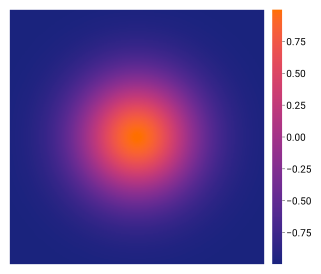
import dartwork_mpl as dm
import matplotlib as mpl

colors = dm.cspace("#1a237e", "#ff6f00", n=256, space="oklch")
cmap = mpl.colors.ListedColormap([c.to_rgb() for c in colors])
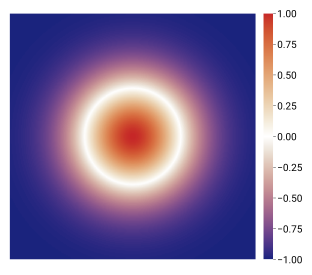
import matplotlib as mpl

left = dm.cspace("#1a237e", "#ffffff", n=128, space="oklch")
right = dm.cspace("#ffffff", "#c62828", n=128, space="oklch")
cmap = mpl.colors.ListedColormap(
    [c.to_rgb() for c in (left[:-1] + right)]
)
Rendering tips
Set
vmin/vmaxyourself for stable colorbars across facets or animations.Reverse a registered continuous map with its
_rsuffix (dc.blue_red_r); reverse qualitative colors withdm.colors(..., reverse=True).Hide colorbar outlines:
cb.outline.set_visible(False).For diverging data, use symmetric limits and
extend="both".
See also
Design rationale — the axioms, metrics, and naming grammar behind every map.
Colors — the full named color-token catalog.
Palettes — discrete series colors from the same families.
Color class — programmatic color manipulation and custom colormap creation.
API › Color Utilities for all color functions.