Note
Go to the end to download the full example code.
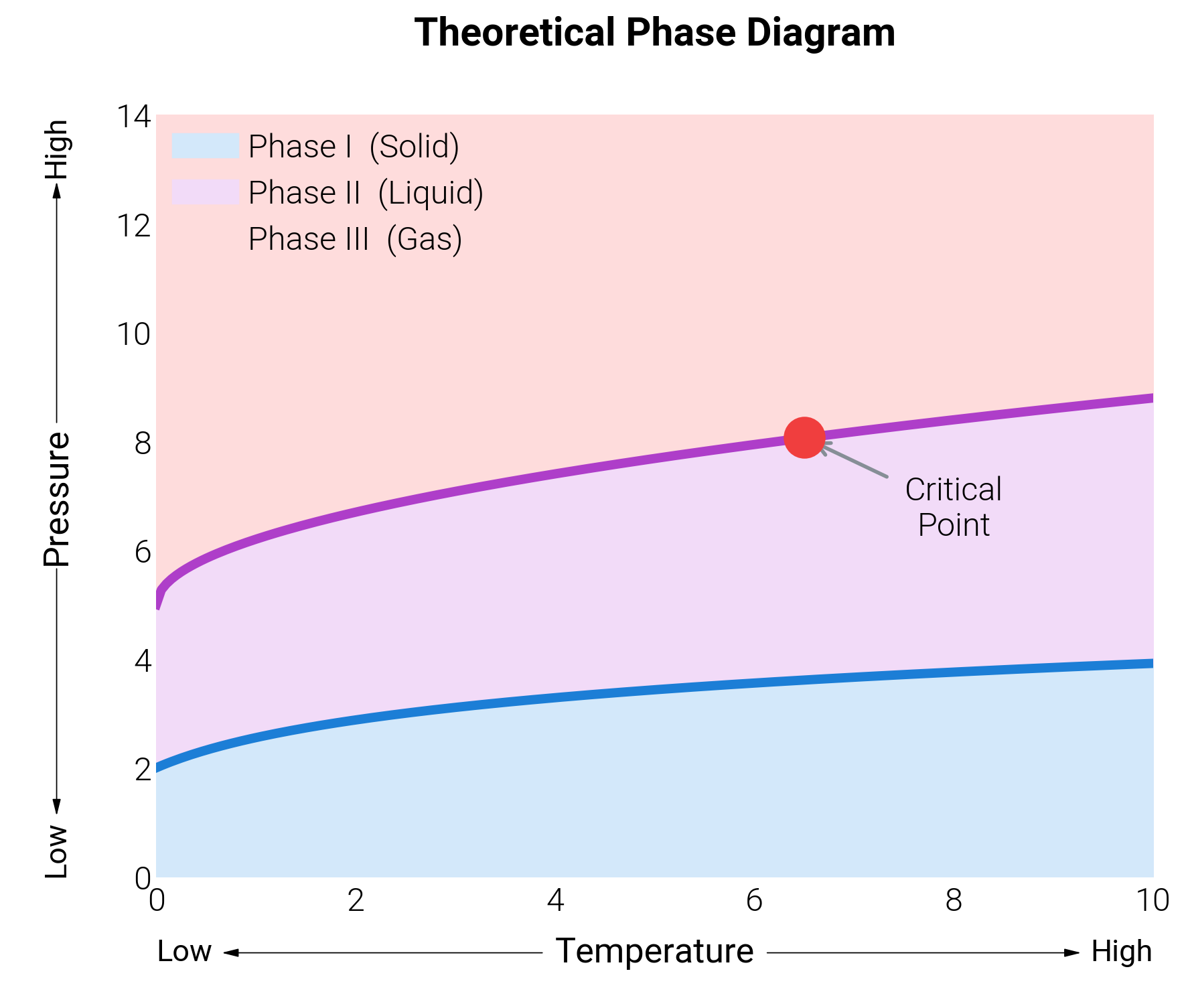
Phase Diagram with Semantic Arrow Axes
Scientific phase diagrams often benefit from replacing standard spines
with directional indicators. dm.arrow_axis() draws a
Low ◄── label ──► High annotation along any axis edge, boosting the
data-ink ratio by encoding meaning directly into the frame.
This example renders a stylized material-science phase diagram with
three regions separated by dm.pseudo_alpha() fills.
import matplotlib.pyplot as plt
import numpy as np

import dartwork_mpl as dm

dm.style.use("minimal")

fig, ax = plt.subplots(figsize=dm.figsize("9cm", 0.85))

# Synthetic phase boundaries
x = np.linspace(0, 10, 200)
boundary1 = 2.0 + 0.8 * np.log1p(x)
boundary2 = 5.0 + 1.2 * np.sqrt(x)

# Phase regions with pseudo-alpha (vector-safe solid colors)
ax.fill_between(
    x,
    0,
    boundary1,
    color=dm.pseudo_alpha("dc.teal3", 0.20, background="white"),
    label="Phase I  (Solid)",
)
ax.fill_between(
    x,
    boundary1,
    boundary2,
    color=dm.pseudo_alpha("dc.violet3", 0.20, background="white"),
    label="Phase II  (Liquid)",
)
ax.fill_between(
    x,
    boundary2,
    14,
    color=dm.pseudo_alpha("dc.orange3", 0.20, background="white"),
    label="Phase III  (Gas)",
)

# Phase boundary lines
ax.plot(x, boundary1, color="dc.teal3", lw=dm.lw(1))
ax.plot(x, boundary2, color="dc.violet3", lw=dm.lw(1))

# Critical point annotation
cp_x, cp_y = 6.5, boundary2[130]
ax.plot(cp_x, cp_y, "o", color="dc.orange3", markersize=8, zorder=5)
ax.annotate(
    "Critical\nPoint",
    xy=(cp_x, cp_y),
    xytext=(cp_x + 1.5, cp_y - 1.8),
    fontsize=dm.fs(-0.5),
    ha="center",
    arrowprops={"arrowstyle": "->", "color": "dc.indigo3", "lw": 0.8},
)

ax.set_title(
    "Theoretical Phase Diagram", fontsize=dm.fs(1), weight="bold", pad=15
)
ax.set_xlim(0, 10)
ax.set_ylim(0, 14)
ax.legend(
    loc="upper left", fontsize=dm.fs(-0.5), framealpha=0.9, edgecolor="white"
)

# Replace standard spines with semantic directional arrows
# Note: Default offset has been improved to -0.10 to avoid overlap
dm.arrow_axis(ax, "x", "Temperature")
dm.arrow_axis(ax, "y", "Pressure")

# Arrow axes extend past the standard plot area — give the bottom and
# left edges extra inset so the arrowheads don't kiss the canvas.
dm.simple_layout(
    fig, ml=dm.inch(0.12), mr=dm.inch(0.08), mb=dm.inch(0.12), mt=dm.inch(0.08)
)
plt.show()
Total running time of the script: (0 minutes 0.310 seconds)