Plot Templates (dm.templates)
A small, intentionally-narrow set of ready-to-use plot templates for chart types that are tedious to build from raw matplotlib but show up constantly in real reports. Templates are added only when a pattern repeats across enough projects to deserve a curated default.
Currently available:
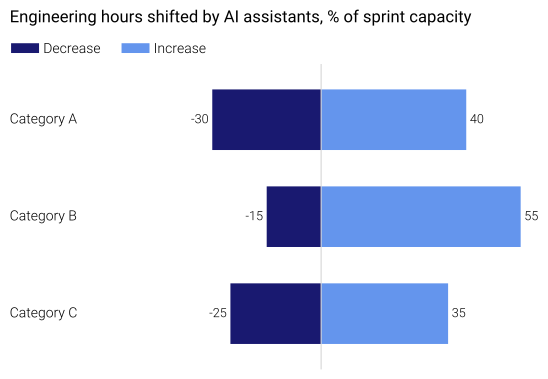
plot_diverging_bar()— symmetrical positive / negative bar layout with integrated legend.
Note
Upgrading from an older alias? See the Migration Guide for the full list of renamed paths and one-shot migration scripts.
Example
import numpy as np
import dartwork_mpl as dm
from dartwork_mpl.templates import plot_diverging_bar

dm.style.use("presentation")

fig, ax = plot_diverging_bar(
    labels=["Category A", "Category B", "Category C"],
    neg_values=np.array([-30, -15, -25]),
    pos_values=np.array([40, 55, 35]),
    neg_label="Decrease",
    pos_label="Increase",
)

dm.simple_layout(fig)
dm.save_formats(fig, "diverging_bar", formats=("png", "svg"))
The same callable is exposed at the top level as
dm.plot_diverging_bar(...).
API
Extended plot functions for dartwork-mpl.
This package extends dartwork-mpl’s core functionality with ready-to-use specialized visualization template functions.
- dartwork_mpl.templates.plot_diverging_bar(labels: list[str] | None = None, neg_values: ndarray[Any, Any] | None = None, pos_values: ndarray[Any, Any] | None = None, add_total: bool = True, figsize: tuple[float, float] | None = None, dpi: int = 300, title: str | None = None, neg_label: str = 'Negative', pos_label: str = 'Positive', colors: dict[str, str] | None = None, hbar_height: float = 0.5, hbar_spacing_factor: float = 1.6, left_margin: float = 0.35, right_margin: float = 0.95, figure_bottom: float = 0.03, base_x: float = 0.02, title_y: float = 0.95, title_to_legend_gap: float = 0.05, legend_to_figure_gap: float = 0.06) tuple[Figure, Axes][source]
Create a diverging bar chart with positive and negative values.
Generates a horizontal bar chart where negative values extend left and positive values extend right from a central axis. Uses a cascading layout with title, legend, and figure stacked vertically.
- Parameters:
labels (list[str] | None, optional) – Category labels shown on the left. Labels are displayed from top to bottom in reverse order. If None, default sample data is used. Default is None.
neg_values (np.ndarray | None, optional) – Array of negative values (one per label). Values should be negative. If None, default sample data is used. Default is None.
pos_values (np.ndarray | None, optional) – Array of positive values (one per label). Values should be positive. If None, default sample data is used. Default is None.
add_total (bool, optional) – If True, appends an “Average” summary row whose values are the mean of each side (labelled “Average”, not “Total”, because the values are averages, not sums). Default is True.
figsize (tuple[float, float] | None, optional) – Figure size (width, height) in inches. If None, (12cm, 12cm) is used. Default is None.
dpi (int, optional) – Figure resolution in dots per inch. Default is 300.
title (str | None, optional) – Title text shown at the top. If None, a default title is used. Default is None.
neg_label (str, optional) – Legend label for negative bars. Default is
"Negative".pos_label (str, optional) – Legend label for positive bars. Default is
"Positive".colors (dict[str, str] | None, optional) – Dictionary with ‘neg’ and ‘pos’ keys. If None, default colors (MidnightBlue for negative, CornflowerBlue for positive) are used. Default is None.
hbar_height (float, optional) – Height of each horizontal bar. Default is 0.5.
hbar_spacing_factor (float, optional) – Bar spacing as a multiple of
hbar_height. Default is 1.6.left_margin (float, optional) – Left margin of the Axes in figure coordinates (0-1). Default is 0.35.
right_margin (float, optional) – Right margin of the Axes in figure coordinates (0-1). Default is 0.95.
figure_bottom (float, optional) – Bottom margin of the Axes in figure coordinates (0-1). Default is 0.03.
base_x (float, optional) – Common x-coordinate for title, legend, and labels in figure coordinates (0-1). Default is 0.02.
title_y (float, optional) – Starting y-coordinate of the title in figure coordinates (0-1). Default is 0.95.
title_to_legend_gap (float, optional) – Gap between title and legend in figure coordinates (0-1). Default is 0.05.
legend_to_figure_gap (float, optional) – Gap between legend and figure area in figure coordinates (0-1). Default is 0.06.
- Returns:
fig (matplotlib.figure.Figure) – The created Figure object.
ax (matplotlib.axes.Axes) – The Axes containing the chart.
Examples
>>> import numpy as np
>>> import dartwork_mpl as dm
>>> dm.style.use('scientific')
>>>
>>> # Minimal setup - uses default sample data
>>> fig, ax = plot_diverging_bar()
>>> dm.save_and_show(fig)
>>>
>>> # Custom data
>>> labels = [
...     "Category A",
...     "Category B",
...     "Category C",
...     "Category D",
...     "Category E",
...     "Category F",
...     "Category G",
...     "Category H",
... ]
>>> neg_values = np.array([-5, -8, -10, -10, -8, -9, -10, -7])
>>> pos_values = np.array([20, 35, 32, 40, 20, 28, 38, 30])
>>> fig, ax = plot_diverging_bar(
...     labels,
...     neg_values,
...     pos_values,
...     neg_label="Loss",
...     pos_label="Gain",
... )
>>> dm.save_and_show(fig)
>>>
>>> # Customize title and colors without Total row
>>> fig, ax = plot_diverging_bar(
...     labels,
...     neg_values,
...     pos_values,
...     add_total=False,
...     title="Custom Title",
...     colors={'neg': 'oc.red5', 'pos': 'oc.green5'}
... )
>>> dm.save_and_show(fig)
Notes
This function uses a cascading layout where the title, legend, and chart are spaced automatically from top to bottom.
Labels are positioned using
blended_transform_factorywhich blends figure x-coordinates with data y-coordinates.The “Total” row (if enabled) is automatically bolded via
dm.fw(1).Value labels are placed inside the bars (left for negative, right for positive).
See also
dartwork_mpl.style.useApply a dartwork-mpl style preset
dartwork_mpl.simple_layoutOptimize figure layout
matplotlib.transforms.blended_transform_factoryCreate blended transforms
Diverging bar chart visualization module.
Provides functions for creating horizontal bar charts that display positive and negative values extending in opposite directions from a central axis.
- dartwork_mpl.templates.diverging_bar.plot_diverging_bar(labels: list[str] | None = None, neg_values: ndarray[Any, Any] | None = None, pos_values: ndarray[Any, Any] | None = None, add_total: bool = True, figsize: tuple[float, float] | None = None, dpi: int = 300, title: str | None = None, neg_label: str = 'Negative', pos_label: str = 'Positive', colors: dict[str, str] | None = None, hbar_height: float = 0.5, hbar_spacing_factor: float = 1.6, left_margin: float = 0.35, right_margin: float = 0.95, figure_bottom: float = 0.03, base_x: float = 0.02, title_y: float = 0.95, title_to_legend_gap: float = 0.05, legend_to_figure_gap: float = 0.06) tuple[Figure, Axes][source]
Create a diverging bar chart with positive and negative values.
Generates a horizontal bar chart where negative values extend left and positive values extend right from a central axis. Uses a cascading layout with title, legend, and figure stacked vertically.
- Parameters:
labels (list[str] | None, optional) – Category labels shown on the left. Labels are displayed from top to bottom in reverse order. If None, default sample data is used. Default is None.
neg_values (np.ndarray | None, optional) – Array of negative values (one per label). Values should be negative. If None, default sample data is used. Default is None.
pos_values (np.ndarray | None, optional) – Array of positive values (one per label). Values should be positive. If None, default sample data is used. Default is None.
add_total (bool, optional) – If True, appends an “Average” summary row whose values are the mean of each side (labelled “Average”, not “Total”, because the values are averages, not sums). Default is True.
figsize (tuple[float, float] | None, optional) – Figure size (width, height) in inches. If None, (12cm, 12cm) is used. Default is None.
dpi (int, optional) – Figure resolution in dots per inch. Default is 300.
title (str | None, optional) – Title text shown at the top. If None, a default title is used. Default is None.
neg_label (str, optional) – Legend label for negative bars. Default is
"Negative".pos_label (str, optional) – Legend label for positive bars. Default is
"Positive".colors (dict[str, str] | None, optional) – Dictionary with ‘neg’ and ‘pos’ keys. If None, default colors (MidnightBlue for negative, CornflowerBlue for positive) are used. Default is None.
hbar_height (float, optional) – Height of each horizontal bar. Default is 0.5.
hbar_spacing_factor (float, optional) – Bar spacing as a multiple of
hbar_height. Default is 1.6.left_margin (float, optional) – Left margin of the Axes in figure coordinates (0-1). Default is 0.35.
right_margin (float, optional) – Right margin of the Axes in figure coordinates (0-1). Default is 0.95.
figure_bottom (float, optional) – Bottom margin of the Axes in figure coordinates (0-1). Default is 0.03.
base_x (float, optional) – Common x-coordinate for title, legend, and labels in figure coordinates (0-1). Default is 0.02.
title_y (float, optional) – Starting y-coordinate of the title in figure coordinates (0-1). Default is 0.95.
title_to_legend_gap (float, optional) – Gap between title and legend in figure coordinates (0-1). Default is 0.05.
legend_to_figure_gap (float, optional) – Gap between legend and figure area in figure coordinates (0-1). Default is 0.06.
- Returns:
fig (matplotlib.figure.Figure) – The created Figure object.
ax (matplotlib.axes.Axes) – The Axes containing the chart.
Examples
>>> import numpy as np
>>> import dartwork_mpl as dm
>>> dm.style.use('scientific')
>>>
>>> # Minimal setup - uses default sample data
>>> fig, ax = plot_diverging_bar()
>>> dm.save_and_show(fig)
>>>
>>> # Custom data
>>> labels = [
...     "Category A",
...     "Category B",
...     "Category C",
...     "Category D",
...     "Category E",
...     "Category F",
...     "Category G",
...     "Category H",
... ]
>>> neg_values = np.array([-5, -8, -10, -10, -8, -9, -10, -7])
>>> pos_values = np.array([20, 35, 32, 40, 20, 28, 38, 30])
>>> fig, ax = plot_diverging_bar(
...     labels,
...     neg_values,
...     pos_values,
...     neg_label="Loss",
...     pos_label="Gain",
... )
>>> dm.save_and_show(fig)
>>>
>>> # Customize title and colors without Total row
>>> fig, ax = plot_diverging_bar(
...     labels,
...     neg_values,
...     pos_values,
...     add_total=False,
...     title="Custom Title",
...     colors={'neg': 'oc.red5', 'pos': 'oc.green5'}
... )
>>> dm.save_and_show(fig)
Notes
This function uses a cascading layout where the title, legend, and chart are spaced automatically from top to bottom.
Labels are positioned using
blended_transform_factorywhich blends figure x-coordinates with data y-coordinates.The “Total” row (if enabled) is automatically bolded via
dm.fw(1).Value labels are placed inside the bars (left for negative, right for positive).
See also
dartwork_mpl.style.useApply a dartwork-mpl style preset
dartwork_mpl.simple_layoutOptimize figure layout
matplotlib.transforms.blended_transform_factoryCreate blended transforms