Quick Start
A minimal end-to-end workflow: apply a style, create a figure, and export it. Skim this in five minutes — you’ll already know enough to ship a publication-grade plot.
Tip
A live ruler below this section maps dm.fs(n) / dm.fw(n) / dm.lw(n)
to actual point sizes and stroke widths under each preset — drag the sliders
to read off the resolved values without leaving the docs.
If the slider doesn’t load (JavaScript disabled, terminal browsers, or offline LLM contexts), the static reference table further down lists the same base values per preset.
At-a-glance ROI
What used to hurt |
dartwork-mpl |
|---|---|
Hand-tuning |
|
|
|
Reaching for hex codes |
|
Saving in 3 formats |
|
Catching margin / overflow problems |
|
Here’s a typical matplotlib figure, then the same figure with dartwork-mpl:
import matplotlib.pyplot as plt
import dartwork_mpl as dm
import numpy as np

dm.style.use("scientific")  # curated fonts, colors, line weights

# width = physical figure width, aspect = height/width ratio
fig, ax = plt.subplots(figsize=dm.figsize("15cm", "wide"))

x = np.linspace(0, 10, 200)
ax.plot(x, np.sin(x), color="dc.teal3", label="signal", lw=dm.lw(1.5))
ax.set_xticks(np.arange(0, 11, 2))
ax.set_xlabel("Time [s]")
ax.set_ylabel("Amplitude")
ax.legend()

dm.simple_layout(fig)           # content-aware margins
dm.save_and_show(fig, "first")  # save + inline preview
import matplotlib.pyplot as plt
import numpy as np

fig, ax = plt.subplots(figsize=(5.91, 3.94), dpi=300)

x = np.linspace(0, 10, 200)
ax.plot(x, np.sin(x), color="#1c7ed6", label="signal", lw=1.5)
ax.set_xticks(np.arange(0, 11, 2))
ax.set_xlabel("Time [s]", fontsize=7.5)
ax.set_ylabel("Amplitude", fontsize=7.5)
ax.legend(fontsize=6.5)

fig.tight_layout()
fig.savefig("output.png", dpi=300, bbox_inches="tight")
plt.show()
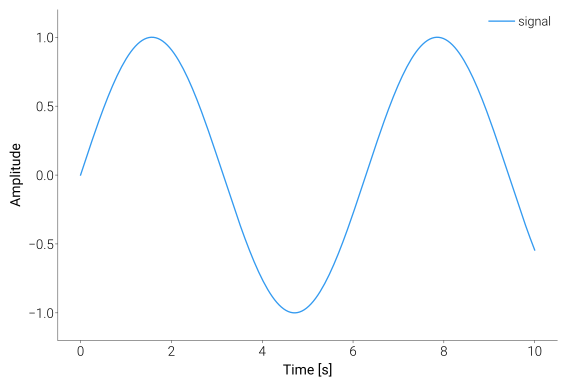
The same chart rendered with dm.style.use("scientific") and
plt.subplots(figsize=dm.figsize(…, …)) — professional typography,
optimized margins, and named colors.
Drag the slider to compare — same data, different styling:
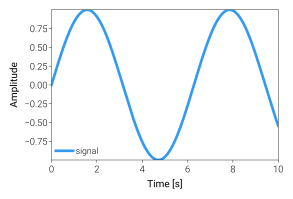
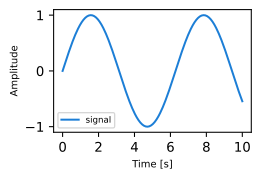
Same data, same plotting logic — the difference is one dm.style.use()
call, the width / aspect arguments on dm.figsize, named colors,
and simple_layout.
What each dartwork-mpl call does:
Call |
Purpose |
|---|---|
|
Sets palette, fonts, line weights — see Styles |
|
Physical width plus an aspect token, returned as the inches tuple |
|
Returns the base font size of the active preset ( |
|
Deterministic content-aware margins (replaces |
|
Saves multi-format and previews inline in the notebook |
Static reference: dm.fs(n) resolved per preset
This is the JS-free equivalent of the live ruler at the top of the
page — same numbers, same purpose. Useful when JavaScript is
disabled (AI agents, terminal browsers) or when copying numbers into a
spreadsheet. Each row is the base font size that ships with the
preset’s font-*.mplstyle; dm.fs(n) returns base + n (in
points), dm.fw(n) and dm.lw(n) apply analogous offsets to font
weight and stroke width.
Preset |
Base |
Typical |
|---|---|---|
|
7.5 |
9.5 |
|
8.0 |
10.0 |
|
11.0 |
13.0 |
|
10.5 |
12.5 |
|
12.0 |
14.0 |
|
7.5 |
9.5 |
Source of truth: src/dartwork_mpl/asset/mplstyle/font-*.mplstyle. If
those values change, regenerate this table.
Creating Figures with dm.figsize
dm.figsize(width, aspect) is the sanctioned way to size a figure. It
returns the inch tuple matplotlib’s figsize= argument expects, so you
keep the native plt.subplots / plt.figure constructors and never
hand-roll inches yourself.
# Physical width plus an aspect token (default aspect="standard" = 3/4)
fig, ax = plt.subplots(figsize=dm.figsize("13cm"))
fig, ax = plt.subplots(figsize=dm.figsize("15cm", "wide"))
fig, ax = plt.subplots(figsize=dm.figsize(dm.cm(11.3), "square"))

# Apply a style preset separately
dm.style.use("scientific")
fig, ax = plt.subplots(figsize=dm.figsize("13cm", "wide"))

# Stacked styles
dm.style.stack(["font-report", "theme-dark"])
fig, axes = plt.subplots(2, 2, figsize=dm.figsize("17cm", "standard"))

# Academic-column shortcuts
fig, ax = plt.subplots(figsize=dm.figsize(dm.col1, "golden"))  # 9 cm
fig, ax = plt.subplots(figsize=dm.figsize(dm.col2, "cinema"))  # 17 cm
Width accepts:
A unit-suffixed string:
"13cm","9.5cm","6.7in","170mm","24pt"A
Lengthvalue:dm.cm(11.3),dm.inch(4.6),dm.mm(170),dm.pt(24), ordm.length("13cm")(string parser)The sugar constants
dm.col1(9 cm) anddm.col2(17 cm)
Bare int / float are rejected — the unit must always be explicit.
The second argument picks the figure’s height in one of four equivalent forms; use whichever reads naturally for the call site:
Form |
Example |
Notes |
|---|---|---|
Aspect token |
|
One of |
Numeric ratio |
|
Positive |
Unit-suffix string height |
|
Width and height units may differ. |
|
|
Useful for |
Bare numeric strings ("0.5") and unknown aspect tokens raise
ValueError with a “did-you-mean” hint, so ambiguous inputs fail
loudly.
Note
The 0.4-era constructors dm.subplots and dm.figure (and their
figsize= / dpi= arguments) were removed. Calls now raise
AttributeError / TypeError with a message naming the modern
plt.subplots(figsize=dm.figsize(...)) form. See
asset/prompt/01-policy.md
for the full lint catalog.
Multi-panel figures:
fig, axes = plt.subplots(
    2, 2,
    figsize=dm.figsize("17cm", "standard"),
    width_ratios=[2, 1],
    height_ratios=[1, 2],
)

for ax in axes.flat:
    ax.plot(np.random.randn(100))

dm.simple_layout(fig)
Adding color
dartwork-mpl ships its own curated palette — dc.* (“dartwork color”),
a 20-family v5 system with 10 perceptual steps per family — and registers six
third-party design systems alongside it. Use any named color anywhere
matplotlib accepts a color string:
# Curated dartwork palette (recommended starting point)
ax.plot(x, y, color="dc.teal3")                   # cool blue
ax.fill_between(x, y1, y2, color="dc.orange1")     # warm accent
ax.bar(categories, values, color="dc.red1")      # bold call-out

# Third-party systems also available for cross-team consistency
ax.plot(x, y2, color="oc.blue5")                   # OpenColor
ax.plot(x, y1, color="tw.emerald500")              # Tailwind
Discover what’s available without leaving Python:
import dartwork_mpl as dm

dm.list_colors()[:2]        # → [{'name': 'amber', 'kind': 'sequential', ...}, ...]
dm.colors("teal", n=5)      # designed 5-color list
dm.show_colors(names=["teal"], n=5)  # preview swatches and ramps
See Colors and Colormaps for the full palette reference, or open the interactive palette explorer to click-and-copy color names from your browser.
Multi-panel layout
import dartwork_mpl as dm
import numpy as np

dm.style.use("presentation")

x = np.linspace(0, 10, 100)
fig = plt.figure(figsize=dm.figsize("15cm", "wide"))
gs = fig.add_gridspec(1, 2, wspace=0.3)
ax1 = fig.add_subplot(gs[0])
ax2 = fig.add_subplot(gs[1])

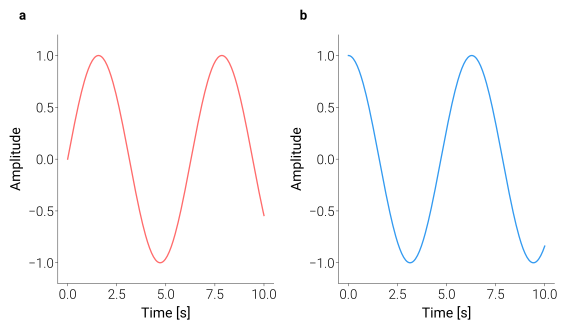
ax1.plot(x, np.sin(x), color="dc.red1")
ax2.plot(x, np.cos(x), color="dc.teal3")

dm.label_axes([ax1, ax2])  # adds (a), (b) panel labels
dm.simple_layout(fig, gs=gs)
Saving in multiple formats
dm.save_formats(
    fig,
    "output/my_figure",
    formats=("png", "svg", "pdf"),
    dpi=300,
    validate=True,  # auto-check for overflow, overlap, etc.
)
Catch problems before you export
validate=True above runs the same checks as the standalone
validate_with_fixes helper, which can also patch the easy issues
in-place:
warnings, fixes = dm.validate_with_fixes(fig)
for w in warnings:         # each is a VisualWarning with fix suggestions
    print(w)
# e.g. MARGIN_ASYMMETRY → fix: dm.simple_layout(fig)
Use it in CI to fail a build when a figure breaks; use it locally to
get a one-line health check before you save_formats.
Try the interactive UI
If you’d rather see the effect of every parameter before committing it to code, dartwork-mpl ships a local web app that wires sliders to your render function and exports the resulting Python script:
# 1. scaffold a starter viewer (first time only)
pip install "dartwork-mpl[ui]"
dartwork-mpl-ui init ./my-viewer --example simple

# 2. run it — opens the viewer in your default browser
cd my-viewer && python viewer.py
Next steps
Choose the right preset for your use case — papers, reports, slides, posters.
Explore 900+ named palettes and perceptual OKLCH interpolation.
Tune fonts, line weights, margins with sliders. Export the exact script that reproduces what you see.
dm.show_colors() / plot_fonts() for asset audit, plus ready-to-use plot
templates like plot_diverging_bar.
Note
Upgrading from a previous PyPI release? The
Migration Guide lists every renamed / removed name
since v0.4.0 with a side-by-side Before → After table — most call
sites are one-liners.